 Jira & Confluence



 Bitrix24
 01
Fill it in the browser
Type into the matrix right on this page — no sign-up. Save it to a free Layers account to keep it.
- Works today Pages, spreadsheets and documents in the browser
Work
ProjectsTasks, sprints and milestones PagesDocs and knowledge base FormsSurveys, quizzes, booking FlowProcesses and mockupsFree Excel template · Comparison
Compare equipment, suppliers or job offers: the matrix is open below. The Excel version weights each criterion, ranks up to six options, names the best one and turns raw prices and specs into 1–5 scores.
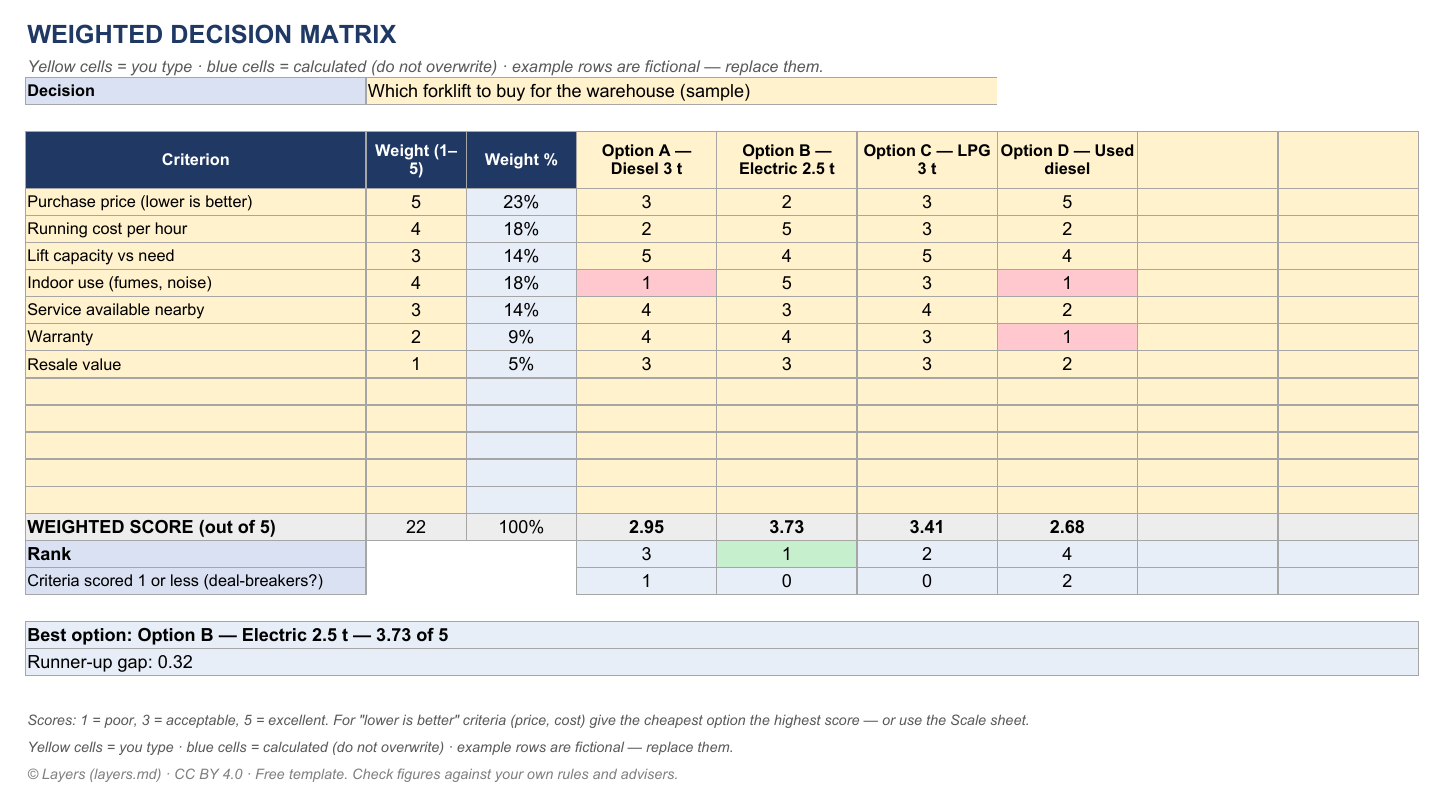
| WEIGHTED DECISION MATRIX | ||||||||
| Yellow cells = you type · blue cells = calculated (do not overwrite) · example rows are fictional — replace them. | ||||||||
| Decision | Which forklift to buy for the warehouse (sample) | |||||||
| Criterion | Weight (1–5) | Weight % | Option A — Diesel 3 t | Option B — Electric 2.5 t | Option C — LPG 3 t | Option D — Used diesel | ||
| Purchase price (lower is better) | 5 | 23% | 3 | 2 | 3 | 5 | ||
| Running cost per hour | 4 | 18% | 2 | 5 | 3 | 2 | ||
| Lift capacity vs need | 3 | 14% | 5 | 4 | 5 | 4 | ||
| Indoor use (fumes, noise) | 4 | 18% | 1 | 5 | 3 | 1 | ||
| Service available nearby | 3 | 14% | 4 | 3 | 4 | 2 | ||
| Warranty | 2 | 9% | 4 | 4 | 3 | 1 | ||
| Resale value | 1 | 5% | 3 | 3 | 3 | 2 | ||
| WEIGHTED SCORE (out of 5) | 22 | 100% | 2.95 | 3.73 | 3.41 | 2.68 | ||
| Rank | 3 | 1 | 2 | 4 | ||||
| Criteria scored 1 or less (deal-breakers?) | 1 | 0 | 0 | 2 | ||||
| Best option: Option B — Electric 2.5 t — 3.73 of 5 | ||||||||
| Runner-up gap: 0.32 | ||||||||
| Scores: 1 = poor, 3 = acceptable, 5 = excellent. For "lower is better" criteria (price, cost) give the cheapest option the highest score — or use the Scale sheet. | ||||||||
| Yellow cells = you type · blue cells = calculated (do not overwrite) · example rows are fictional — replace them. | ||||||||
| © Layers (layers.md) · CC BY 4.0 · Free template. Check figures against your own rules and advisers. | ||||||||
| SCALE RAW NUMBERS TO 1–5 (min–max) — copy the scores into the Matrix | |||||||
| Yellow cells = you type · blue cells = calculated (do not overwrite) · example rows are fictional — replace them. | |||||||
| Criterion | Better is | Option A — Diesel 3 t | Option B — Electric 2.5 t | Option C — LPG 3 t | Option D — Used diesel | 0 | 0 |
| Purchase price, USD | Lower | 28,500 | 34,000 | 29,800 | 14,500 | ||
| → score 1–5 | 2.1 | 1.0 | 1.9 | 5.0 | |||
| Running cost per hour, USD | Lower | 6.8 | 2.1 | 5.2 | 7.4 | ||
| → score 1–5 | 1.5 | 5.0 | 2.7 | 1.0 | |||
| Capacity, kg | Higher | 3,000 | 2,500 | 3,000 | 2,500 | ||
| → score 1–5 | 5.0 | 1.0 | 5.0 | 1.0 | |||
| → score 1–5 | |||||||
| → score 1–5 | |||||||
| → score 1–5 | |||||||
| → score 1–5 | |||||||
| → score 1–5 | |||||||
| © Layers (layers.md) · CC BY 4.0 · Free template. Check figures against your own rules and advisers. |
Start typing right in the document — no sign-up. It stays in this browser; save it to your free Layers account to keep it, open it on your phone and share it.
What is inside
Up to 12 criteria, weight 1–5, shown as % of the total.
Each option scored 1–5 per criterion; scores of 1 flagged as possible deal-breakers.
Weighted score out of 5, rank, best option and the gap to the runner-up.
Prices, costs or specs → 1–5 by min–max, for "lower is better" or "higher is better".
Yellow cells are for you to type, blue cells are calculated. Ordinary formulas, no macros — opens in Excel, Google Sheets and LibreOffice. Licence CC BY 4.0 · © Layers (layers.md).
How to use it
1
Name the options across the top.
2
List what matters and weight it 1–5.
3
1 = poor, 3 = acceptable, 5 = excellent — the cheapest gets 5 on price.
4
Look at the best option and the gap; a tie means a criterion is missing.
5
Record the decision and the two reasons next to the matrix.
What people do next
Send the same specification to each supplier, in one shared folder.
Turn the decision into tasks with owners and dates.
Honest status: Works today is live now; Coming is not yet.
01
Type into the matrix right on this page — no sign-up. Save it to a free Layers account to keep it.
02
Formulas, checks and print layout in .xlsx — opens in Excel, Google Sheets and LibreOffice.
03
One folder for the team: everyone sees the latest version; comments instead of e-mail threads.
04
Open the .xlsx in the Layers spreadsheet editor with formulas, without Microsoft Office.
A table that scores each option against criteria, multiplies each score by the criterion's weight and adds them up. The highest weighted score is the best fit for what matters to you.
Give each criterion 1 (nice to have) to 5 (must have). The template turns weights into percentages that add up to 100%.
Give the cheapest option the highest score, or type the prices on the Scale sheet with "Lower" — it computes 1–5 scores for you.
Yes, the .xlsx opens in Excel, Google Sheets and LibreOffice.
No. The matrix is open on this page; sign in free only to save it.
More free Excel templates
The template and the editor are free. Layers is free for teams of up to 20 people.
Templates are starting points. Check figures and rules with your accountant, engineer or the agency concerned. Layers is an independent product.
We use no tracking cookies: the site only remembers the theme and language you choose. Analytics and third-party videos will only be turned on with your consent. About cookies