 Jira & Confluence



 Bitrix24
 01
Fill it in the browser
Type into the invoice right on this page — no sign-up. Save it to a free Layers account to keep it.
- Works today Pages, spreadsheets and documents in the browser
Work
ProjectsTasks, sprints and milestones PagesDocs and knowledge base FormsSurveys, quizzes, booking FlowProcesses and mockupsFree Excel template · Invoice
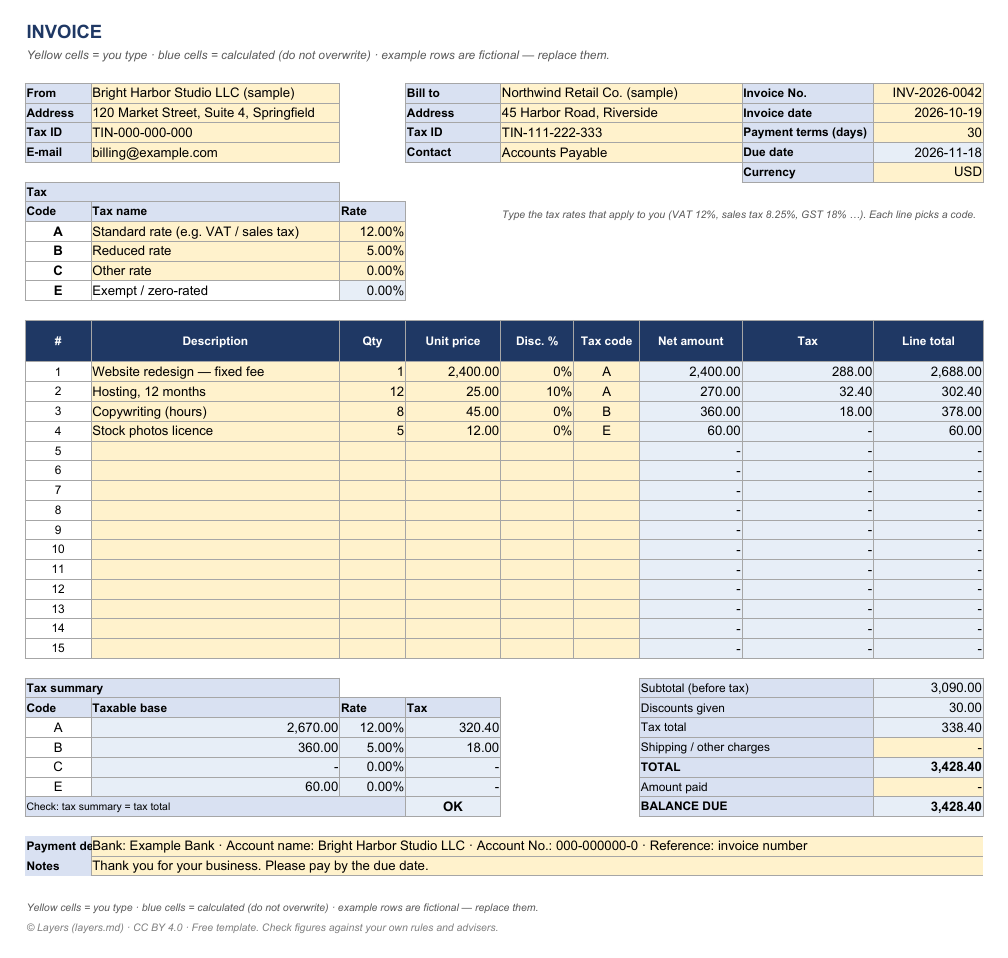
Type your items below: net amount, tax and total are worked out per line, with a tax summary for each rate. The Excel version has the formulas, three tax rates and a print-ready layout.
| INVOICE | ||||||||
| Yellow cells = you type · blue cells = calculated (do not overwrite) · example rows are fictional — replace them. | ||||||||
| From | Bright Harbor Studio LLC (sample) | Bill to | Northwind Retail Co. (sample) | Invoice No. | INV-2026-0042 | |||
| Address | 120 Market Street, Suite 4, Springfield | Address | 45 Harbor Road, Riverside | Invoice date | 2026-10-19 | |||
| Tax ID | TIN-000-000-000 | Tax ID | TIN-111-222-333 | Payment terms (days) | 30 | |||
| billing@example.com | Contact | Accounts Payable | Due date | 2026-11-18 | ||||
| Currency | USD | |||||||
| Tax | ||||||||
| Code | Tax name | Rate | Type the tax rates that apply to you (VAT 12%, sales tax 8.25%, GST 18% …). Each line picks a code. | |||||
| A | Standard rate (e.g. VAT / sales tax) | 12.00% | ||||||
| B | Reduced rate | 5.00% | ||||||
| C | Other rate | 0.00% | ||||||
| E | Exempt / zero-rated | 0.00% | ||||||
| # | Description | Qty | Unit price | Disc. % | Tax code | Net amount | Tax | Line total |
| 1 | Website redesign — fixed fee | 1 | 2,400.00 | 0% | A | 2,400.00 | 288.00 | 2,688.00 |
| 2 | Hosting, 12 months | 12 | 25.00 | 10% | A | 270.00 | 32.40 | 302.40 |
| 3 | Copywriting (hours) | 8 | 45.00 | 0% | B | 360.00 | 18.00 | 378.00 |
| 4 | Stock photos licence | 5 | 12.00 | 0% | E | 60.00 | - | 60.00 |
| 5 | - | - | - | |||||
| 6 | - | - | - | |||||
| 7 | - | - | - | |||||
| 8 | - | - | - | |||||
| 9 | - | - | - | |||||
| 10 | - | - | - | |||||
| 11 | - | - | - | |||||
| 12 | - | - | - | |||||
| 13 | - | - | - | |||||
| 14 | - | - | - | |||||
| 15 | - | - | - | |||||
| Tax summary | Subtotal (before tax) | 3,090.00 | ||||||
| Code | Taxable base | Rate | Tax | Discounts given | 30.00 | |||
| A | 2,670.00 | 12.00% | 320.40 | Tax total | 338.40 | |||
| B | 360.00 | 5.00% | 18.00 | Shipping / other charges | - | |||
| C | - | 0.00% | - | TOTAL | 3,428.40 | |||
| E | 60.00 | 0.00% | - | Amount paid | - | |||
| Check: tax summary = tax total | OK | BALANCE DUE | 3,428.40 | |||||
| Payment details | Bank: Example Bank · Account name: Bright Harbor Studio LLC · Account No.: 000-000000-0 · Reference: invoice number | |||||||
| Notes | Thank you for your business. Please pay by the due date. | |||||||
| Yellow cells = you type · blue cells = calculated (do not overwrite) · example rows are fictional — replace them. | ||||||||
| © Layers (layers.md) · CC BY 4.0 · Free template. Check figures against your own rules and advisers. | ||||||||
Start typing right in the document — no sign-up. It stays in this browser; save it to your free Layers account to keep it, open it on your phone and share it.
What is inside
Qty × unit price − discount = net; tax per line by code (A, B, C or exempt).
Type VAT 12%, sales tax 8.25%, GST 18% — each line picks a code.
Taxable base and tax for each rate, with a check that it equals the tax total.
Subtotal, discounts, tax, shipping, total, amount paid and balance due; due date from the payment terms.
Yellow cells are for you to type, blue cells are calculated. Ordinary formulas, no macros — opens in Excel, Google Sheets and LibreOffice. Licence CC BY 4.0 · © Layers (layers.md).
How to use it
1
Business name, address and tax ID once — copy the sheet for each new invoice.
2
Invoice number, date and payment terms; the due date is calculated.
3
Type the rates that apply to you in the tax table.
4
Description, quantity, unit price, discount and tax code for each line.
5
Save as PDF and send; record the payment in "Amount paid".
What people do next
One line per invoice with paid / unpaid status — the next thing an accountant asks for.
A monthly statement of open invoices to each client.
Honest status: Works today is live now; Coming is not yet.
01
Type into the invoice right on this page — no sign-up. Save it to a free Layers account to keep it.
02
Formulas, checks and print layout in .xlsx — opens in Excel, Google Sheets and LibreOffice.
03
One folder for the team: everyone sees the latest version; comments instead of e-mail threads.
04
Open the .xlsx in the Layers spreadsheet editor with formulas, without Microsoft Office.
Tax = net amount × tax rate, where net = quantity × unit price − discount. Add the tax to the net amount for the line total. The template does this for every line and sums the tax by rate.
Yes. Set up to three rates (A, B, C) plus exempt, and pick a code on each line. The tax summary shows the base and tax for each rate.
Before tax: tax is charged on the discounted net amount, which is the usual rule for VAT and sales tax.
Yes. The .xlsx opens in Excel, Google Sheets and LibreOffice with the formulas intact.
No. The invoice is open on this page — type in it right away. Sign in free only to save it to your Layers.
More free Excel templates
The template and the editor are free. Layers is free for teams of up to 20 people.
Templates are starting points. Check figures and rules with your accountant, engineer or the agency concerned. Layers is an independent product.
We use no tracking cookies: the site only remembers the theme and language you choose. Analytics and third-party videos will only be turned on with your consent. About cookies