 Jira & Confluence



 Bitrix24
 01
Fill it in the browser
Type into the statement right on this page — no sign-up. Save it to a free Layers account to keep it.
- Works today Pages, spreadsheets and documents in the browser
Work
ProjectsTasks, sprints and milestones PagesDocs and knowledge base FormsSurveys, quizzes, booking FlowProcesses and mockupsFree Excel template · Bank statement
Paste up to 400 lines from any bank or system export. Each line gets a category from your keyword rules, and the summary adds them by month — money in, money out, net, with a check that nothing was lost.
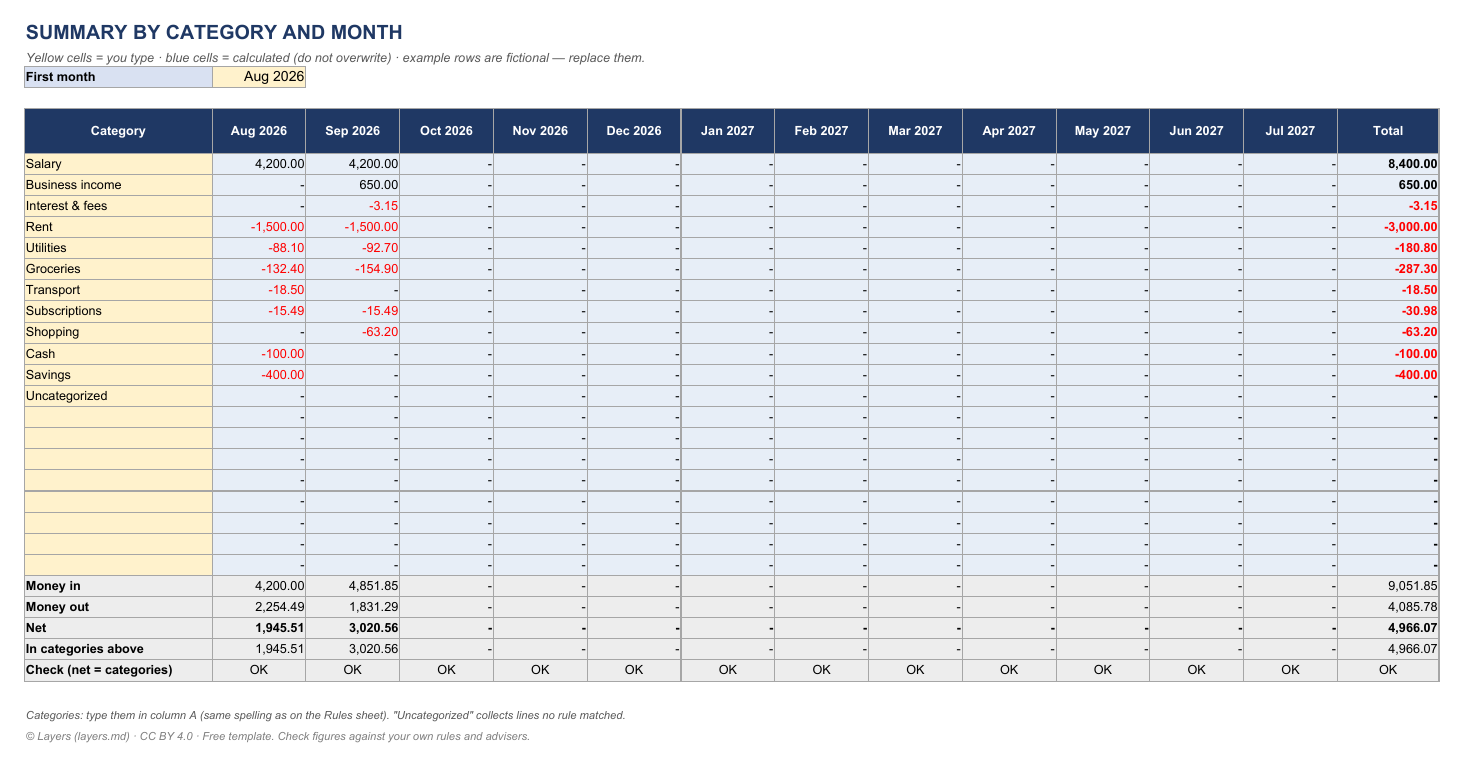
| SUMMARY BY CATEGORY AND MONTH | |||||||||||||
| Yellow cells = you type · blue cells = calculated (do not overwrite) · example rows are fictional — replace them. | |||||||||||||
| First month | Aug 2026 | ||||||||||||
| Category | Aug 2026 | Sep 2026 | Oct 2026 | Nov 2026 | Dec 2026 | Jan 2027 | Feb 2027 | Mar 2027 | Apr 2027 | May 2027 | Jun 2027 | Jul 2027 | Total |
| Salary | 4,200.00 | 4,200.00 | - | - | - | - | - | - | - | - | - | - | 8,400.00 |
| Business income | - | 650.00 | - | - | - | - | - | - | - | - | - | - | 650.00 |
| Interest & fees | - | −3.15 | - | - | - | - | - | - | - | - | - | - | −3.15 |
| Rent | −1,500.00 | −1,500.00 | - | - | - | - | - | - | - | - | - | - | −3,000.00 |
| Utilities | −88.10 | −92.70 | - | - | - | - | - | - | - | - | - | - | −180.80 |
| Groceries | −132.40 | −154.90 | - | - | - | - | - | - | - | - | - | - | −287.30 |
| Transport | −18.50 | - | - | - | - | - | - | - | - | - | - | - | −18.50 |
| Subscriptions | −15.49 | −15.49 | - | - | - | - | - | - | - | - | - | - | −30.98 |
| Shopping | - | −63.20 | - | - | - | - | - | - | - | - | - | - | −63.20 |
| Cash | −100.00 | - | - | - | - | - | - | - | - | - | - | - | −100.00 |
| Savings | −400.00 | - | - | - | - | - | - | - | - | - | - | - | −400.00 |
| Uncategorized | - | - | - | - | - | - | - | - | - | - | - | - | - |
| - | - | - | - | - | - | - | - | - | - | - | - | - | |
| - | - | - | - | - | - | - | - | - | - | - | - | - | |
| Money in | 4,200.00 | 4,851.85 | - | - | - | - | - | - | - | - | - | - | 9,051.85 |
| Money out | 2,254.49 | 1,831.29 | - | - | - | - | - | - | - | - | - | - | 4,085.78 |
| Net | 1,945.51 | 3,020.56 | - | - | - | - | - | - | - | - | - | - | 4,966.07 |
| In categories above | 1,945.51 | 3,020.56 | - | - | - | - | - | - | - | - | - | - | 4,966.07 |
| Check (net = categories) | OK | OK | OK | OK | OK | OK | OK | OK | OK | OK | OK | OK | OK |
| Categories: type them in column A (same spelling as on the Rules sheet). "Uncategorized" collects lines no rule matched. | |||||||||||||
| © Layers (layers.md) · CC BY 4.0 · Free template. Check figures against your own rules and advisers. |
| TRANSACTIONS — paste your bank / system export here (columns A–E) | ||||||||||
| Yellow cells = you type · blue cells = calculated (do not overwrite) · example rows are fictional — replace them. | ||||||||||
| Opening balance | 3,250.00 | Paste only the values (Ctrl+Shift+V). Use either Debit/Credit columns or one signed Amount column. | ||||||||
| Date | Description (as in the export) | Debit (money out) | Credit (money in) | Amount (+/−) | Signed amount | Category | Month | Running balance | Check | |
| 2026-08-01 | PAYROLL ACME CORP AUG | 4,200.00 | 4,200.00 | Salary | Aug 2026 | 7,450.00 | ||||
| 2026-08-02 | RENT AUGUST - LANDLORD | 1,500.00 | −1,500.00 | Rent | Aug 2026 | 5,950.00 | ||||
| 2026-08-05 | SUPERMARKET FRESHMART 0045 | 132.40 | −132.40 | Groceries | Aug 2026 | 5,817.60 | ||||
| 2026-08-08 | ELECTRIC CO AUTOPAY | 88.10 | −88.10 | Utilities | Aug 2026 | 5,729.50 | ||||
| 2026-08-12 | UBER TRIP | 18.50 | −18.50 | Transport | Aug 2026 | 5,711.00 | ||||
| 2026-08-15 | TRANSFER TO SAVINGS | 400.00 | −400.00 | Savings | Aug 2026 | 5,311.00 | ||||
| 2026-08-20 | NETFLIX.COM | 15.49 | −15.49 | Subscriptions | Aug 2026 | 5,295.51 | ||||
| 2026-08-27 | ATM WITHDRAWAL 7731 | 100.00 | −100.00 | Cash | Aug 2026 | 5,195.51 | ||||
| 2026-09-01 | PAYROLL ACME CORP SEP | 4,200.00 | 4,200.00 | Salary | Sep 2026 | 9,395.51 | ||||
| 2026-09-02 | RENT SEPTEMBER - LANDLORD | 1,500.00 | −1,500.00 | Rent | Sep 2026 | 7,895.51 | ||||
| 2026-09-06 | SUPERMARKET FRESHMART 0045 | 154.90 | −154.90 | Groceries | Sep 2026 | 7,740.61 | ||||
| 2026-09-09 | ELECTRIC CO AUTOPAY | 92.70 | −92.70 | Utilities | Sep 2026 | 7,647.91 | ||||
| 2026-09-14 | AMAZON MKTPLACE | 63.20 | −63.20 | Shopping | Sep 2026 | 7,584.71 | ||||
| 2026-09-18 | INTEREST PAID | 1.85 | 1.85 | Interest & fees | Sep 2026 | 7,586.56 | ||||
| 2026-09-20 | NETFLIX.COM | 15.49 | −15.49 | Subscriptions | Sep 2026 | 7,571.07 | ||||
| 2026-09-25 | CLIENT PAYMENT INV-118 | 650.00 | 650.00 | Business income | Sep 2026 | 8,221.07 | ||||
| 2026-09-28 | MONTHLY SERVICE FEE | 5.00 | −5.00 | Interest & fees | Sep 2026 | 8,216.07 | ||||
| 8,216.07 | ||||||||||
| 8,216.07 | ||||||||||
| 8,216.07 | ||||||||||
| 8,216.07 | ||||||||||
| 8,216.07 | ||||||||||
| 8,216.07 | ||||||||||
| 8,216.07 | ||||||||||
| 8,216.07 | ||||||||||
| 8,216.07 | ||||||||||
| 8,216.07 | ||||||||||
| 8,216.07 | ||||||||||
| 8,216.07 | ||||||||||
| 8,216.07 | ||||||||||
| 8,216.07 | ||||||||||
| 8,216.07 | ||||||||||
| 8,216.07 | ||||||||||
| 8,216.07 | ||||||||||
| 8,216.07 | ||||||||||
| 8,216.07 | ||||||||||
| 8,216.07 | ||||||||||
| 8,216.07 | ||||||||||
| 8,216.07 | ||||||||||
| 8,216.07 | ||||||||||
| 8,216.07 | ||||||||||
| 8,216.07 | ||||||||||
| 8,216.07 | ||||||||||
| 8,216.07 | ||||||||||
| 8,216.07 | ||||||||||
| 8,216.07 | ||||||||||
| 8,216.07 | ||||||||||
| 8,216.07 | ||||||||||
| 8,216.07 | ||||||||||
| 8,216.07 | ||||||||||
| 8,216.07 | ||||||||||
| 8,216.07 | ||||||||||
| 8,216.07 | ||||||||||
| 8,216.07 | ||||||||||
| 8,216.07 | ||||||||||
| 8,216.07 | ||||||||||
| 8,216.07 | ||||||||||
| 8,216.07 | ||||||||||
| 8,216.07 | ||||||||||
| 8,216.07 | ||||||||||
| 8,216.07 | ||||||||||
| 8,216.07 | ||||||||||
| 8,216.07 | ||||||||||
| 8,216.07 | ||||||||||
| 8,216.07 |
… more rows in the Excel file
| RULES — if the description contains the keyword, the line gets the category (the LAST matching rule wins) | ||
| Yellow cells = you type · blue cells = calculated (do not overwrite) · example rows are fictional — replace them. | ||
| Keyword (not case-sensitive) | Category | Example |
| PAYROLL | Salary | PAYROLL ACME CORP |
| CLIENT PAYMENT | Business income | CLIENT PAYMENT INV-118 |
| INTEREST | Interest & fees | INTEREST PAID |
| SERVICE FEE | Interest & fees | MONTHLY SERVICE FEE |
| RENT | Rent | RENT AUGUST |
| ELECTRIC | Utilities | ELECTRIC CO AUTOPAY |
| WATER | Utilities | |
| SUPERMARKET | Groceries | SUPERMARKET FRESHMART |
| UBER | Transport | UBER TRIP |
| FUEL | Transport | |
| NETFLIX | Subscriptions | NETFLIX.COM |
| AMAZON | Shopping | AMAZON MKTPLACE |
| ATM | Cash | ATM WITHDRAWAL |
| TRANSFER TO SAVINGS | Savings | TRANSFER TO SAVINGS |
Start typing right in the document — no sign-up. It stays in this browser; save it to your free Layers account to keep it, open it on your phone and share it.
What is inside
Date, description, debit / credit or one signed amount — as your export has them; running balance.
Keyword → category ("NETFLIX" → Subscriptions); the last matching rule wins.
Every category by month for 12 months, money in / out / net and a reconciliation check.
Ordinary formulas — works in Excel, Google Sheets and LibreOffice.
Yellow cells are for you to type, blue cells are calculated. Ordinary formulas, no macros — opens in Excel, Google Sheets and LibreOffice. Licence CC BY 4.0 · © Layers (layers.md).
How to use it
1
Download the statement as CSV or Excel from online banking or your accounting system.
2
Paste date, description and amounts into the Transactions sheet (Paste values).
3
For lines marked "Uncategorized", add a keyword and category on the Rules sheet.
4
Pick the first month; see each category by month.
5
Net equals the categories and the running balance equals the bank closing balance.
What people do next
Use the monthly averages as your budget plan.
Share the folder instead of e-mailing statements.
Honest status: Works today is live now; Coming is not yet.
01
Type into the statement right on this page — no sign-up. Save it to a free Layers account to keep it.
02
Formulas, checks and print layout in .xlsx — opens in Excel, Google Sheets and LibreOffice.
03
One folder for the team: everyone sees the latest version; comments instead of e-mail threads.
04
Open the .xlsx in the Layers spreadsheet editor with formulas, without Microsoft Office.
Most banks let you download transactions as CSV in online banking. Open the CSV, copy the columns and paste them as values into the Transactions sheet. For PDF-only statements, copy the table or use your bank's CSV export instead.
Paste it into "Amount (+/−)" and leave Debit and Credit empty — the template takes whichever is filled.
If the description contains a keyword from the Rules sheet, the line gets that category. Rules are not case-sensitive; when several match, the last one wins.
Not if you use the Excel file on your computer. If you save it to Layers, it is stored in your private Drive.
No. The template is open on this page; sign in free only to save it.
More free Excel templates
The template and the editor are free. Layers is free for teams of up to 20 people.
Templates are starting points. Check figures and rules with your accountant, engineer or the agency concerned. Layers is an independent product.
We use no tracking cookies: the site only remembers the theme and language you choose. Analytics and third-party videos will only be turned on with your consent. About cookies