 Jira & Confluence



 Bitrix24
 01
Fill it in the browser
Type into the budget right on this page — no sign-up. Save it to a free Layers account to keep it.
- Works today Pages, spreadsheets and documents in the browser
Work
ProjectsTasks, sprints and milestones PagesDocs and knowledge base FormsSurveys, quizzes, booking FlowProcesses and mockupsPhilippines · Free Excel template
Your budget is open below: type your salary and bills in pesos. The Excel version keeps 12 months of actuals next to the plan, checks 50/30/20 and tells you how many months to your emergency fund.
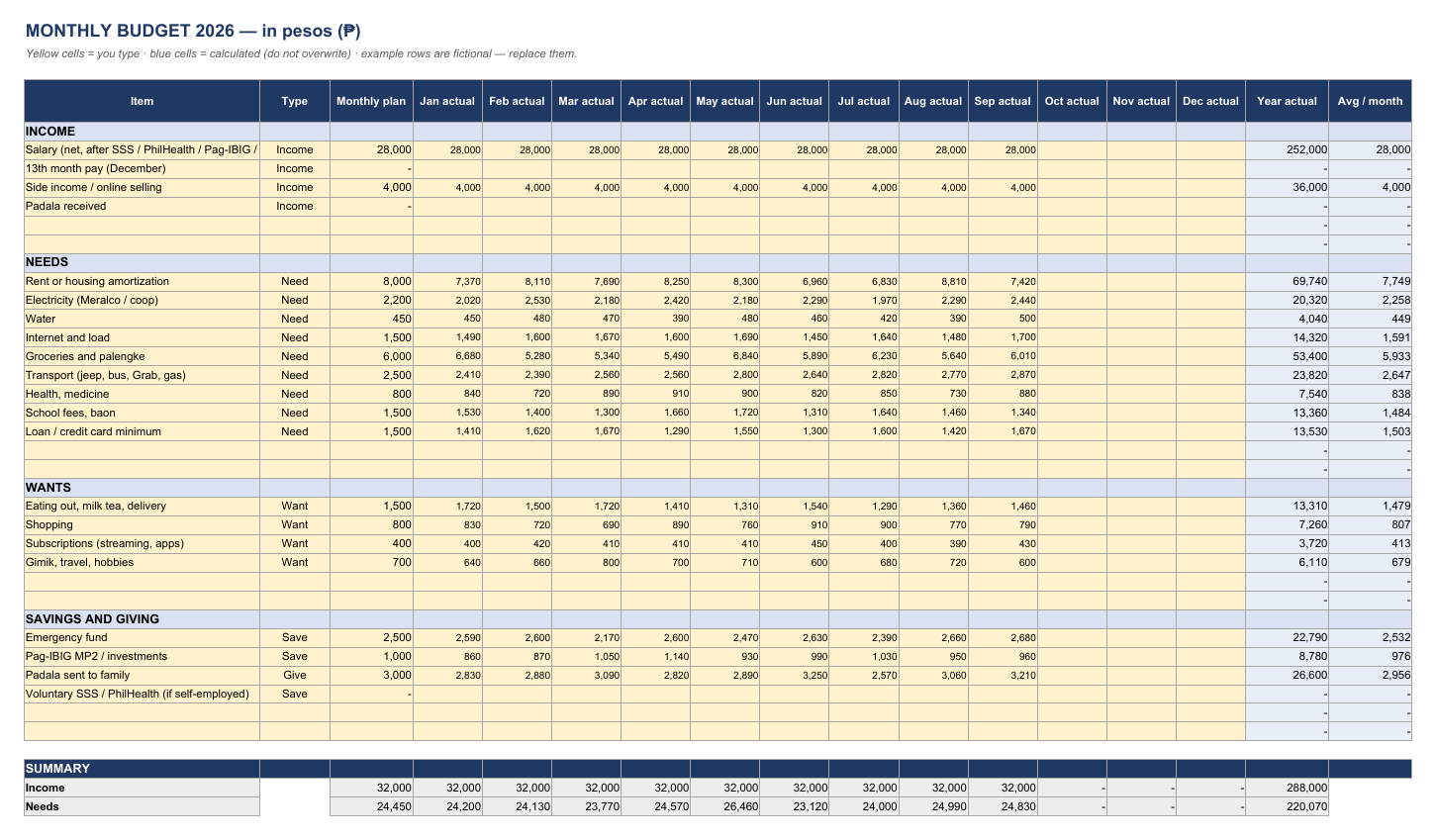
| MONTHLY BUDGET 2026 — in pesos (₱) | ||||||||||||||||
| Yellow cells = you type · blue cells = calculated (do not overwrite) · example rows are fictional — replace them. | ||||||||||||||||
| Item | Type | Monthly plan | Jan actual | Feb actual | Mar actual | Apr actual | May actual | Jun actual | Jul actual | Aug actual | Sep actual | Oct actual | Nov actual | Dec actual | Year actual | Avg / month |
| INCOME | ||||||||||||||||
| Salary (net, after SSS / PhilHealth / Pag-IBIG / tax) | Income | 28,000 | 28,000 | 28,000 | 28,000 | 28,000 | 28,000 | 28,000 | 28,000 | 28,000 | 28,000 | 252,000 | 28,000 | |||
| 13th month pay (December) | Income | - | - | - | ||||||||||||
| Side income / online selling | Income | 4,000 | 4,000 | 4,000 | 4,000 | 4,000 | 4,000 | 4,000 | 4,000 | 4,000 | 4,000 | 36,000 | 4,000 | |||
| Padala received | Income | - | - | - | ||||||||||||
| - | - | |||||||||||||||
| - | - | |||||||||||||||
| NEEDS | ||||||||||||||||
| Rent or housing amortization | Need | 8,000 | 7,370 | 8,110 | 7,690 | 8,250 | 8,300 | 6,960 | 6,830 | 8,810 | 7,420 | 69,740 | 7,749 | |||
| Electricity (Meralco / coop) | Need | 2,200 | 2,020 | 2,530 | 2,180 | 2,420 | 2,180 | 2,290 | 1,970 | 2,290 | 2,440 | 20,320 | 2,258 | |||
| Water | Need | 450 | 450 | 480 | 470 | 390 | 480 | 460 | 420 | 390 | 500 | 4,040 | 449 | |||
| Internet and load | Need | 1,500 | 1,490 | 1,600 | 1,670 | 1,600 | 1,690 | 1,450 | 1,640 | 1,480 | 1,700 | 14,320 | 1,591 | |||
| Groceries and palengke | Need | 6,000 | 6,680 | 5,280 | 5,340 | 5,490 | 6,840 | 5,890 | 6,230 | 5,640 | 6,010 | 53,400 | 5,933 | |||
| Transport (jeep, bus, Grab, gas) | Need | 2,500 | 2,410 | 2,390 | 2,560 | 2,560 | 2,800 | 2,640 | 2,820 | 2,770 | 2,870 | 23,820 | 2,647 | |||
| Health, medicine | Need | 800 | 840 | 720 | 890 | 910 | 900 | 820 | 850 | 730 | 880 | 7,540 | 838 | |||
| School fees, baon | Need | 1,500 | 1,530 | 1,400 | 1,300 | 1,660 | 1,720 | 1,310 | 1,640 | 1,460 | 1,340 | 13,360 | 1,484 | |||
| Loan / credit card minimum | Need | 1,500 | 1,410 | 1,620 | 1,670 | 1,290 | 1,550 | 1,300 | 1,600 | 1,420 | 1,670 | 13,530 | 1,503 | |||
| - | - | |||||||||||||||
| - | - | |||||||||||||||
| WANTS | ||||||||||||||||
| Eating out, milk tea, delivery | Want | 1,500 | 1,720 | 1,500 | 1,720 | 1,410 | 1,310 | 1,540 | 1,290 | 1,360 | 1,460 | 13,310 | 1,479 | |||
| Shopping | Want | 800 | 830 | 720 | 690 | 890 | 760 | 910 | 900 | 770 | 790 | 7,260 | 807 | |||
| Subscriptions (streaming, apps) | Want | 400 | 400 | 420 | 410 | 410 | 410 | 450 | 400 | 390 | 430 | 3,720 | 413 | |||
| Gimik, travel, hobbies | Want | 700 | 640 | 660 | 800 | 700 | 710 | 600 | 680 | 720 | 600 | 6,110 | 679 | |||
| - | - | |||||||||||||||
| - | - | |||||||||||||||
| SAVINGS AND GIVING | ||||||||||||||||
| Emergency fund | Save | 2,500 | 2,590 | 2,600 | 2,170 | 2,600 | 2,470 | 2,630 | 2,390 | 2,660 | 2,680 | 22,790 | 2,532 | |||
| Pag-IBIG MP2 / investments | Save | 1,000 | 860 | 870 | 1,050 | 1,140 | 930 | 990 | 1,030 | 950 | 960 | 8,780 | 976 | |||
| Padala sent to family | Give | 3,000 | 2,830 | 2,880 | 3,090 | 2,820 | 2,890 | 3,250 | 2,570 | 3,060 | 3,210 | 26,600 | 2,956 | |||
| Voluntary SSS / PhilHealth (if self-employed) | Save | - | - | - | ||||||||||||
| - | - | |||||||||||||||
| - | - | |||||||||||||||
| SUMMARY | ||||||||||||||||
| Income | 32,000 | 32,000 | 32,000 | 32,000 | 32,000 | 32,000 | 32,000 | 32,000 | 32,000 | 32,000 | - | - | - | 288,000 | ||
| Needs | 24,450 | 24,200 | 24,130 | 23,770 | 24,570 | 26,460 | 23,120 | 24,000 | 24,990 | 24,830 | - | - | - | 220,070 | ||
| Wants | 3,400 | 3,590 | 3,300 | 3,620 | 3,410 | 3,190 | 3,500 | 3,270 | 3,240 | 3,280 | - | - | - | 30,400 | ||
| Savings | 3,500 | 3,450 | 3,470 | 3,220 | 3,740 | 3,400 | 3,620 | 3,420 | 3,610 | 3,640 | - | - | - | 31,570 | ||
| Giving (padala) | 3,000 | 2,830 | 2,880 | 3,090 | 2,820 | 2,890 | 3,250 | 2,570 | 3,060 | 3,210 | - | - | - | 26,600 | ||
| LEFT OVER (income − everything) | −2,350 | −2,070 | −1,780 | −1,700 | −2,540 | −3,940 | −1,490 | −1,260 | −2,900 | −2,960 | - | - | - | −20,640 | ||
| 50/30/20 check (on the monthly plan) | ||||||||||||||||
| Needs — target 50% of income | 76% | Look again | ||||||||||||||
| Wants — target 30% of income | 11% | OK | ||||||||||||||
| Savings + giving — target 20% of income | 20% | OK | ||||||||||||||
| Emergency fund target (6 × monthly needs) | 146,700 | |||||||||||||||
| Saved so far for emergencies (type) | 18,000 | |||||||||||||||
| Months to reach the target at the planned rate | 52 | |||||||||||||||
| Type: Income · Need · Want · Save · Give — the summary adds by type, so you can add your own lines. Sample numbers are illustrative. | ||||||||||||||||
| Yellow cells = you type · blue cells = calculated (do not overwrite) · example rows are fictional — replace them. | ||||||||||||||||
| © Layers (layers.md) · CC BY 4.0 · Free template. Check figures against your own rules and advisers. | ||||||||||||||||
Start typing right in the document — no sign-up. It stays in this browser; save it to your free Layers account to keep it, open it on your phone and share it.
What is inside
Rent or amortization, Meralco, water, internet and load, palengke, transport, baon, loans.
Emergency fund, Pag-IBIG MP2, padala to family, voluntary SSS / PhilHealth.
Monthly plan and actual for each month, year total and average.
50/30/20, money left over (red if negative), months to your emergency fund.
Yellow cells are for you to type, blue cells are calculated. Ordinary formulas, no macros — opens in Excel, Google Sheets and LibreOffice. Licence CC BY 4.0 · © Layers (layers.md).
How to use it
1
Net salary after SSS, PhilHealth, Pag-IBIG and tax; side income; 13th month in December.
2
A monthly amount for every bill and expense.
3
At month end type what you really spent.
4
Needs ≤ 50%, wants ≤ 30%, savings and padala ≥ 20%.
5
Aim for six months of needs; the sheet counts the months to get there.
What people do next
Paste your bank or e-wallet export to see where money really went.
Decide in advance how much goes to savings in December.
Honest status: Works today is live now; Coming is not yet.
01
Type into the budget right on this page — no sign-up. Save it to a free Layers account to keep it.
02
Formulas, checks and print layout in .xlsx — opens in Excel, Google Sheets and LibreOffice.
03
One folder for the team: everyone sees the latest version; comments instead of e-mail threads.
04
Open the .xlsx in the Layers spreadsheet editor with formulas, without Microsoft Office.
List your net income, then every expense with a planned amount; at month end type the actual amounts. The template adds them by type and shows what is left over.
50% of income for needs (rent, bills, food, transport), 30% for wants, 20% for savings and debt payments. In the Philippines many put padala in the 20% — adjust to your family.
Three to six months of needs. The sheet uses six months and counts how long it takes at your planned savings.
Yes, the .xlsx opens in Google Sheets and on phones.
No. The budget is open on this page; sign in free only to save it.
More free Excel templates
The template and the editor are free. Layers is free for teams of up to 20 people.
Templates are starting points. Check figures and rules with your accountant, engineer or the agency concerned. Layers is an independent product.
We use no tracking cookies: the site only remembers the theme and language you choose. Analytics and third-party videos will only be turned on with your consent. About cookies