 Jira & Confluence



 Bitrix24
 01
Fill it in the browser
Type into the report right on this page — no sign-up. Save it to a free Layers account to keep it.
- Works today Pages, spreadsheets and documents in the browser
Work
ProjectsTasks, sprints and milestones PagesDocs and knowledge base FormsSurveys, quizzes, booking FlowProcesses and mockupsFree Excel template · Weekly report
The report for this week is open below: type the numbers and the tasks. The Excel version marks each number on track / at risk / off track, flags overdue tasks and keeps a 12-week chart.
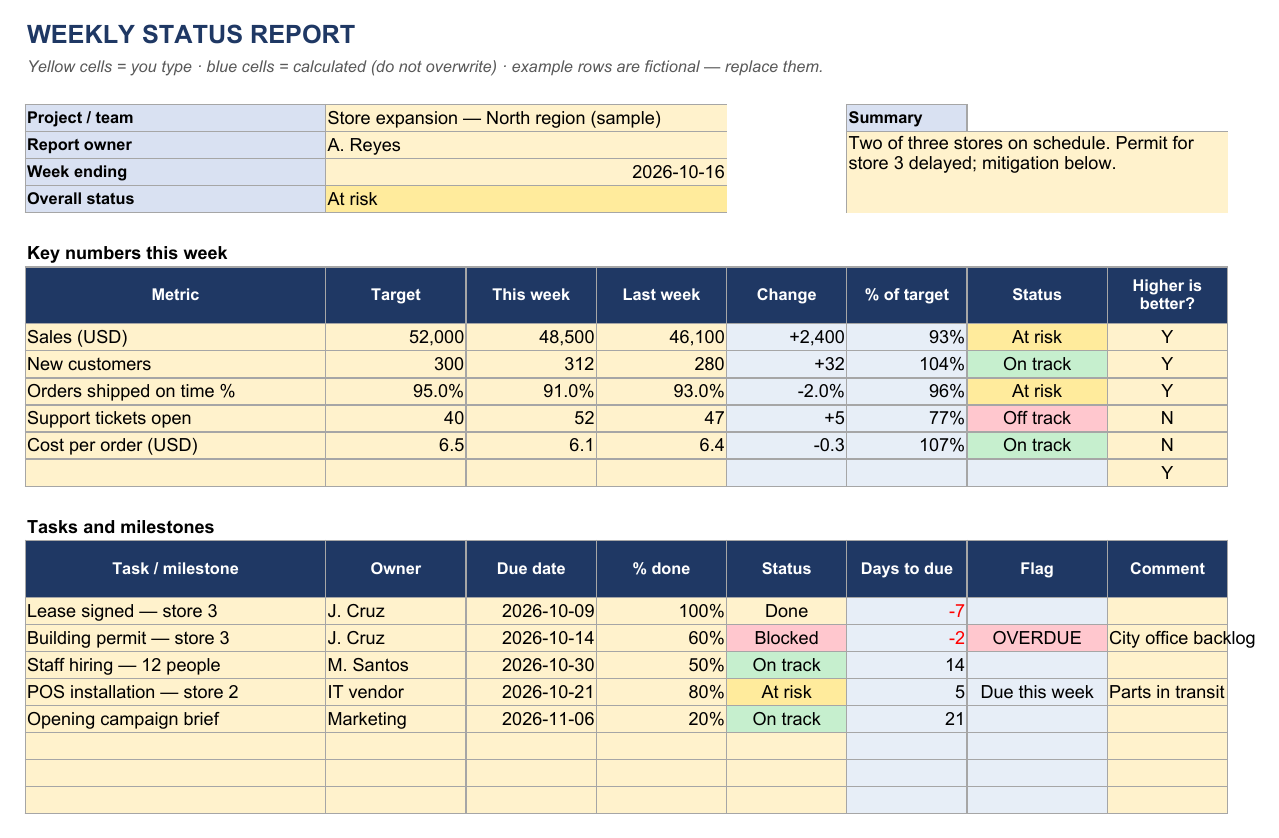
| WEEKLY STATUS REPORT | |||||||
| Yellow cells = you type · blue cells = calculated (do not overwrite) · example rows are fictional — replace them. | |||||||
| Project / team | Store expansion — North region (sample) | Summary | |||||
| Report owner | A. Reyes | Two of three stores on schedule. Permit for store 3 delayed; mitigation below. | |||||
| Week ending | 2026-10-16 | ||||||
| Overall status | At risk | ||||||
| Key numbers this week | |||||||
| Metric | Target | This week | Last week | Change | % of target | Status | Higher is better? |
| Sales (USD) | 52,000 | 48,500 | 46,100 | +2,400 | 93% | At risk | Y |
| New customers | 300 | 312 | 280 | +32 | 104% | On track | Y |
| Orders shipped on time % | 95.0% | 91.0% | 93.0% | −2.0% | 96% | At risk | Y |
| Support tickets open | 40 | 52 | 47 | +5 | 77% | Off track | N |
| Cost per order (USD) | 6.5 | 6.1 | 6.4 | −0.3 | 107% | On track | N |
| Y | |||||||
| Tasks and milestones | |||||||
| Task / milestone | Owner | Due date | % done | Status | Days to due | Flag | Comment |
| Lease signed — store 3 | J. Cruz | 2026-10-09 | 100% | Done | −7 | ||
| Building permit — store 3 | J. Cruz | 2026-10-14 | 60% | Blocked | −2 | OVERDUE | City office backlog |
| Staff hiring — 12 people | M. Santos | 2026-10-30 | 50% | On track | 14 | ||
| POS installation — store 2 | IT vendor | 2026-10-21 | 80% | At risk | 5 | Due this week | Parts in transit |
| Opening campaign brief | Marketing | 2026-11-06 | 20% | On track | 21 | ||
| 2 on track · 1 at risk · 1 blocked · 1 done · 1 overdue | |||||||
| Risks and issues | |||||||
| Risk / issue | Impact | Owner | Mitigation | ||||
| Permit for store 3 late | High | J. Cruz | Escalate to city office; prepare temporary kiosk | ||||
| POS parts in transit | Medium | IT vendor | Loaner terminals from vendor | ||||
| Plan for next week | |||||||
| Permit decision; start fit-out of store 3 | |||||||
| Finish hiring interviews | |||||||
| POS go-live in store 2 | |||||||
| Yellow cells = you type · blue cells = calculated (do not overwrite) · example rows are fictional — replace them. | |||||||
| © Layers (layers.md) · CC BY 4.0 · Free template. Check figures against your own rules and advisers. | |||||||
| KPI history — one row per week (copy "This week" here each Friday) | |||||
| Yellow cells = you type · blue cells = calculated (do not overwrite) · example rows are fictional — replace them. | |||||
| Week ending | Sales (USD) | New customers | On time % | Tickets open | Cost per order |
| 2026-07-31 | 40,763 | 234 | 92.4% | 35 | 6.91 |
| 2026-08-07 | 41,847 | 239 | 92.2% | 36 | 7.01 |
| 2026-08-14 | 41,839 | 243 | 90.5% | 40 | 6.77 |
| 2026-08-21 | 42,235 | 265 | 92.5% | 44 | 6.8 |
| 2026-08-28 | 43,157 | 274 | 93.8% | 39 | 6.74 |
| 2026-09-04 | 44,162 | 261 | 95.9% | 41 | 6.66 |
| 2026-09-11 | 44,272 | 275 | 92.5% | 46 | 6.5 |
| 2026-09-18 | 45,281 | 289 | 94.9% | 44 | 6.43 |
| 2026-09-25 | 46,469 | 298 | 91.1% | 44 | 6.45 |
| 2026-10-02 | 46,078 | 302 | 90.4% | 46 | 6.37 |
| 2026-10-09 | 47,688 | 303 | 94.7% | 50 | 6.32 |
| 2026-10-16 | 48,178 | 307 | 91.8% | 54 | 6.17 |
| © Layers (layers.md) · CC BY 4.0 · Free template. Check figures against your own rules and advisers. |
Start typing right in the document — no sign-up. It stays in this browser; save it to your free Layers account to keep it, open it on your phone and share it.
What is inside
Target, this week, last week, change and % of target — status by rule (≥ 100%, 90–99%, < 90%).
Owner, due date, % done, status; "OVERDUE" and "Due this week" flags.
Impact, owner and mitigation for each.
One row per week and a line chart — the trend your manager asks about.
Yellow cells are for you to type, blue cells are calculated. Ordinary formulas, no macros — opens in Excel, Google Sheets and LibreOffice. Licence CC BY 4.0 · © Layers (layers.md).
How to use it
1
Set the date; days to due are counted from it.
2
Type this week next to last week; mark if lower is better (costs, tickets).
3
Update % done and status; overdue ones turn red.
4
What could stop you and what you do about it.
5
Each Friday copy the numbers to the History sheet.
What people do next
One link the team updates — the latest version, no attachments.
The same tasks with owners and due dates in Layers Projects.
Honest status: Works today is live now; Coming is not yet.
01
Type into the report right on this page — no sign-up. Save it to a free Layers account to keep it.
02
Formulas, checks and print layout in .xlsx — opens in Excel, Google Sheets and LibreOffice.
03
One folder for the team: everyone sees the latest version; comments instead of e-mail threads.
04
Open the .xlsx in the Layers spreadsheet editor with formulas, without Microsoft Office.
Overall status, the key numbers against target, progress on tasks and milestones, risks and issues with owners, and the plan for next week — on one page.
Red, amber, green: green is on track, amber at risk, red off track. The template sets it from the ratio to target — 100% or more on track, 90–99% at risk, below 90% off track; for numbers where lower is better (costs, open tickets) the ratio is reversed.
Yes — put the indicators you monitor in "Key numbers" and the weekly readings in History.
Yes, the .xlsx opens in Excel, Google Sheets and LibreOffice.
No. The report is open on this page. Sign in free only to save it.
More free Excel templates
The template and the editor are free. Layers is free for teams of up to 20 people.
Templates are starting points. Check figures and rules with your accountant, engineer or the agency concerned. Layers is an independent product.
We use no tracking cookies: the site only remembers the theme and language you choose. Analytics and third-party videos will only be turned on with your consent. About cookies