 Jira & Confluence




 Bitrix24
Construction change order · Word · client signature
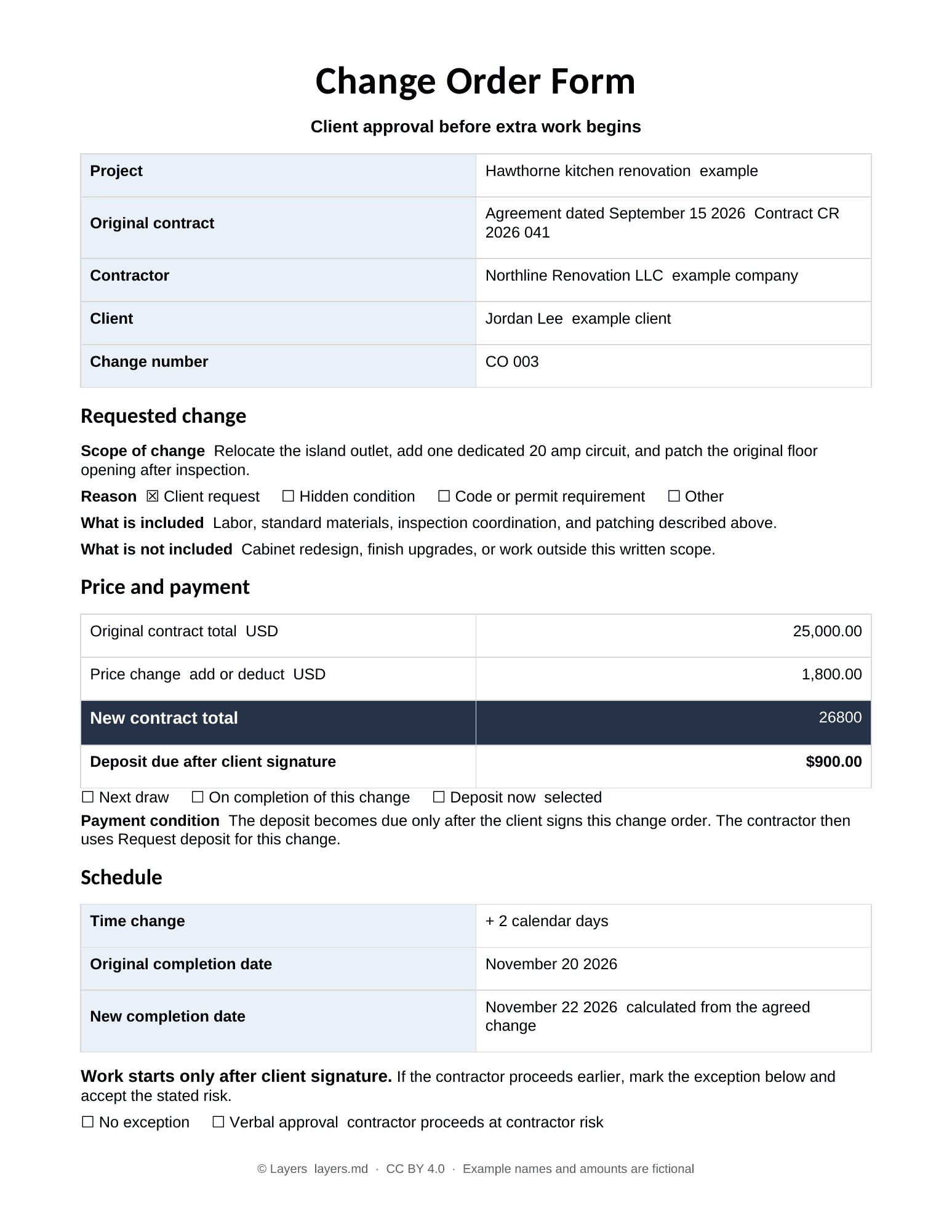
Change Order Form — signed by the client before the extra work starts
Ready, not blank.
Fill it in and download it in Word for free.
Short answer. Send the change from your phone, the client approves the price and signs the document before the extra work starts, and you keep a signed record. Changed work: after the client signs the written change order (default in this form).
Price and schedule
Calculate the change before you send it
Use a minus sign for a credit. The new contract total and completion date update as you type.
- New contract total
- $26,800.00
- New completion date
- November 22, 2026
- Deposit due after signature
- $900.00
- Fill the formScope, price, timing and payment terms.
- Choose Sign documentThe client approves with a code sent to their email.
- Request deposit for this changeOnly after the signed PDF is recorded.
We will ask you to confirm this address, then email you the recipient’s reply.
Start typing right in the document — no sign-up. It stays in this browser; save it to your free Layers account to keep it, open it on your phone and share it.
Enter a date — we’ll count the deadlines
- Start only after the client signs the change ordertype the date
Layers never asks for a code or payment in a message.
Check your own case.
Enter the date the client signs. State rules and the original contract may require additional notices or terms.
Work already done? Confirmation of extra work (Word) →

Lida, Layers template assistant
Enter the original total, the change amount and the schedule impact. I will show the new total and date before the client sees them.
Fill the Word form, choose Sign document, and request the deposit only after the signature is recorded.
Deadlines
The rules, with the source
| What | Deadline | Source |
|---|---|---|
| Changed work | after the client signs the written change order | default in this form |
| New contract total | original contract total plus or minus this change | calculated |
| New completion date | original completion date plus or minus agreed days | calculated |
| Deposit | requested only after the signed PDF is recorded | selected payment term |
Requirements vary by state, contract type and project. This form does not claim that the same signature or change-order rule applies everywhere.
Step by step
What to do, in order
1
Describe the change
Identify the original contract and change number, then write the changed scope, reason, exclusions and optional photo.
2
Check price and time
Enter the price change with a plus or minus sign and the time change. Confirm the calculated total and completion date.
3
Send and sign
Open the Word document, make the first edit, then choose Sign document. The client confirms their email with a one time code.
4
Collect the deposit
When Deposit now is selected, request the deposit only after the client signature and signed PDF are recorded.
Questions
Do I need the client's signature before starting the extra work?
Some states and home improvement contracts require a written, signed change before changed work begins. Even when the rule differs, starting without a signed price and scope creates a payment risk. Check your state and contract.
Is an email or text approval enough?
A message can help show what was discussed, but a signed change order that states the scope, price, new total and timing is clearer. State law and the original contract control.
What if the client agrees verbally on site?
Send the change from your phone immediately and ask the client to sign. If you proceed first, the form records that as verbal approval at the contractor's risk.
How do I track several change orders on one job?
Give every change its own number, keep each signed PDF with the original contract, and update the change log and running contract total.
Can the change reduce the price?
Yes. Enter a negative price change. The calculator subtracts it from the original contract total and the signed form preserves the credit.
Work already done without a change order — can I still charge?
Put it in writing now: what changed, who asked and when, the evidence, and the extra amount, dated today. Whether you can collect depends on your contract and state law; the written confirmation shows what happened.
Can I backdate a change order?
No. Date the confirmation today and write the dates of the request and the work inside it.
The client agreed by text. Does that count?
Attach the message as evidence of the request. Rules on oral and text agreements vary by state.
Official sources
Other documents
Keep the papers in one place
Letters, receipts and notices in one folder you can share with family or a lawyer. The templates and the editor are free; Layers is free for up to 20 people.
General drafting and arithmetic aid, not legal advice. Home improvement, change-order, electronic-signature, payment and cancellation rules vary by state and project.