 Jira & Confluence



 Bitrix24
 A decorative timeline
A milestone without an owner, status or evidence does not help a decision.
Work
ProjectsTasks, sprints and milestones PagesDocs and knowledge base FormsSurveys, quizzes, booking FlowProcesses and mockupsProject kickoff · step 5
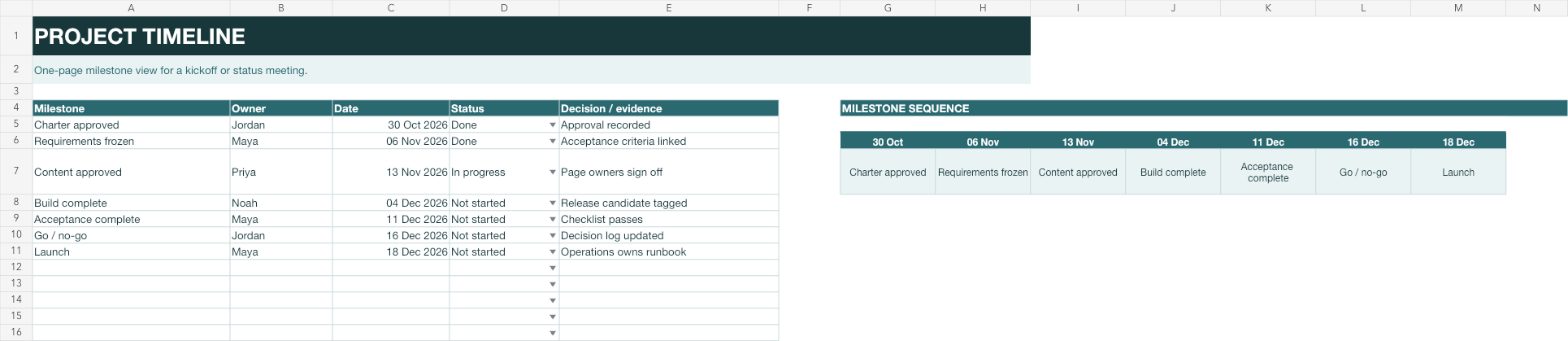
Summarise the few dates stakeholders need to remember. The milestone strip is linked to the table, so updates stay consistent.
No sign-up to start. The document stays editable in this browser; sign-in appears only when you save it to a workspace or invite a team.
Start editing here — no sign-up. Send the result first; sign in only if you want to keep it in a workspace or invite your team.
The situation
The delivery team needs the full plan, while sponsors and participants need a compact story of decisions and milestones. The timeline keeps that summary tied to dated, owned evidence.
How to use it
1
Keep decisions, approvals, releases and handovers — not every task.
2
Each milestone needs a person who will bring the evidence to the decision.
3
Update the table; the milestone sequence reads from it.
4
Send the filled result before a status meeting or include it with the minutes.
Filled example
The example follows charter approval through launch. Each milestone includes an owner, current status and the evidence required to call it complete.
Common mistakes
A milestone without an owner, status or evidence does not help a decision.
If everything is highlighted, nothing is. Use the project plan for detail.
Update the decision note whenever a milestone moves, including who accepted the change.
FAQ
A timeline highlights major milestones for communication. A Gantt shows task spans and overlaps for planning.
Yes. Its dates and labels reference the main milestone table.
Use the smallest set that explains the project’s decision path. Seven are shown in the example, but the right number depends on the work.
Yes. Send the file or a view-only link; saving to a workspace is optional.
We use no advertising cookies. With your consent we turn on Google Analytics to see which pages help; without it nothing is sent to Google. About cookies