 Jira & Confluence



 Bitrix24
 Several Accountable roles
Two A entries split the final decision. Keep one A and move the other role to R or C.
Work
ProjectsTasks, sprints and milestones PagesDocs and knowledge base FormsSurveys, quizzes, booking FlowProcesses and mockupsProject kickoff · step 2
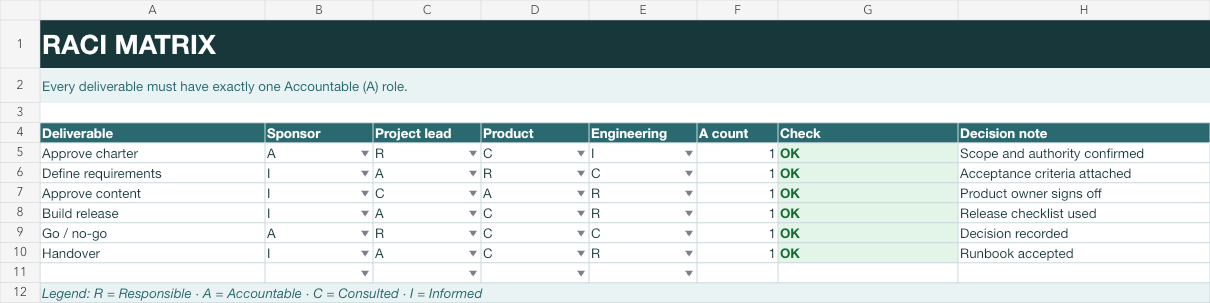
Assign Responsible, Accountable, Consulted and Informed roles. The Check column flags any deliverable without exactly one A.
No sign-up to start. The document stays editable in this browser; sign-in appears only when you save it to a workspace or invite a team.
Start editing here — no sign-up. Send the result first; sign in only if you want to keep it in a workspace or invite your team.
The situation
The charter names project leadership, but delivery still fails when several people think someone else owns a decision. A RACI matrix makes responsibility visible at the deliverable level before work is scheduled.
How to use it
1
Use outcomes that can be accepted, not every small activity.
2
Give each row exactly one Accountable role — the person who owns the outcome.
3
Responsible does the work, Consulted gives input, and Informed receives the decision.
4
The spreadsheet Check column must show OK for every populated row.
Filled example
The filled matrix assigns the sponsor to approve the charter and go/no-go, the project lead to own requirements, build and handover, and one delivery role to each task. Every row returns OK.
Common mistakes
Two A entries split the final decision. Keep one A and move the other role to R or C.
An oversized matrix becomes maintenance work. Use it for meaningful deliverables and decisions.
Prefer stable roles in the matrix; record the current people in the plan or team list.
FAQ
It counts A entries in each populated row and returns OK only when the count is exactly one.
Yes, when that person both performs and owns the work. Use one cell per role column and keep one A in the row.
No. Add only the roles that are Responsible, Accountable, Consulted or Informed for that deliverable.
Yes. The R/A/C/I list, formulas and conditional formatting are stored in the XLSX file.
We use no advertising cookies. With your consent we turn on Google Analytics to see which pages help; without it nothing is sent to Google. About cookies