 Jira & Confluence



 Bitrix24
 Dates without dependencies
A list of dates cannot explain what slips next. Link predecessor tasks explicitly.
Work
ProjectsTasks, sprints and milestones PagesDocs and knowledge base FormsSurveys, quizzes, booking FlowProcesses and mockupsProject kickoff · step 3
Translate the charter and RACI into owned work. Dates calculate duration, and dependencies show what must finish before the next task starts.
No sign-up to start. The document stays editable in this browser; sign-in appears only when you save it to a workspace or invite a team.
Start editing here — no sign-up. Send the result first; sign in only if you want to keep it in a workspace or invite your team.
The situation
The project has authority and clear roles; now the team needs a sequence it can actually run. The plan connects each task to an owner, start and finish dates, a status and the work it depends on.
How to use it
1
Create tasks that produce a reviewable result.
2
Use the RACI decision to assign the person who will drive each task.
3
Schedule from constraints and predecessor work, not from optimism.
4
Update status and evidence in the same rhythm as project decisions.
Filled example
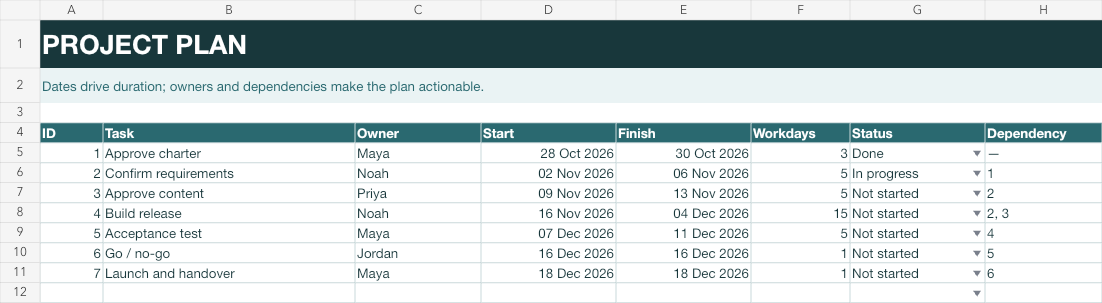
The example sequences charter approval, requirements, content, build, acceptance, go/no-go and handover. Workdays calculate from the Start and Finish cells.
Common mistakes
A list of dates cannot explain what slips next. Link predecessor tasks explicitly.
“Work on content” cannot be accepted. “Approve product-page copy” can.
Choose a review cadence and make the plan part of the decision meeting.
FAQ
A deliverable-oriented task list with one owner, start and finish dates, dependencies and a current status.
The template uses Excel NETWORKDAYS from Start to Finish.
Use a zero- or one-day decision task when the milestone needs an owner and evidence, such as go/no-go.
Yes. The F1 spreadsheet opens on the page without registration.
We use no advertising cookies. With your consent we turn on Google Analytics to see which pages help; without it nothing is sent to Google. About cookies