 Jira & Confluence




 Bitrix24
New hire · 201 file · SSS, PhilHealth, Pag-IBIG, BIR
Employee onboarding form — one link for the new hire, and the information sheet with consent fills itself
Ready, not blank.
Fill it in and download it in Word for free.
Short answer. Send the new hire one link before day one. Each answer becomes an employee information sheet for the 201 file, with the data privacy consent inside, ready to send for signature. Report the employee to SSS immediately: coverage starts on the first day of work.
What you get
Employee list
| Name | Position | Start date |
|---|---|---|
| Ana Reyes | Virtual assistant | 2026-11-03 |
| Mark Santos | Bookkeeper | 2026-11-03 |
| Liza Cruz | Sales associate | 2026-11-16 |
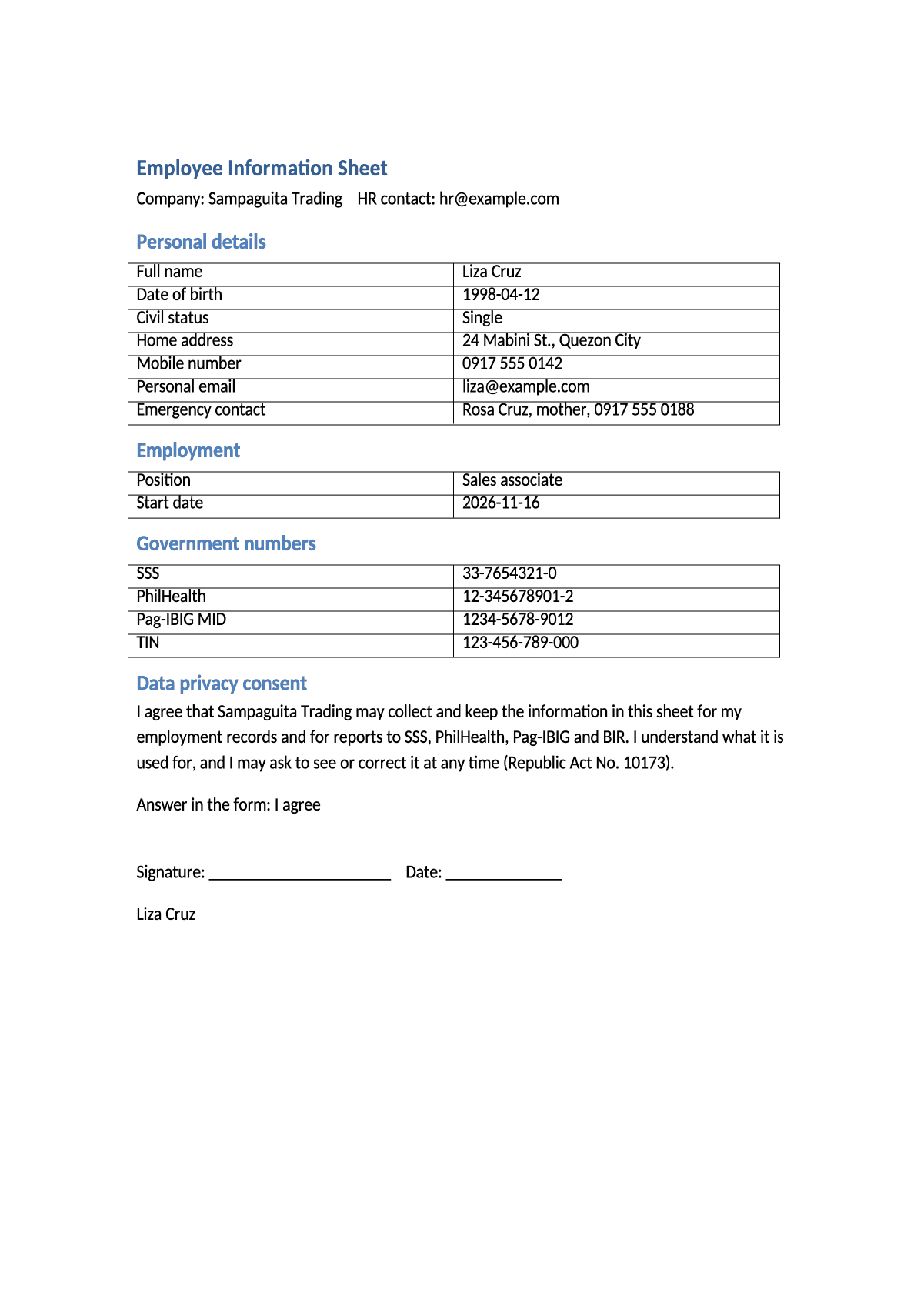
Employee information sheet
- Full name
- Liza Cruz
- Position
- Sales associate
- Start date
- 2026-11-16
- SSS
- 33-7654321-0
Made from each answer and saved in your Drive, with the privacy consent inside. Send it for signature from the same row.
Example with 3 test answers. Nothing leaves this page.
Your own copy opens with the document already connected. The full form has 14 questions; a new hire needs no account.
We will ask you to confirm this address, then email you the recipient’s reply.
Start typing right in the document — no sign-up. It stays in this browser; save it to your free Layers account to keep it, open it on your phone and share it.
Enter a date — we’ll count the deadlines
- Send the onboarding form to the new hiretype the date
- SSS coverage starts on this day. Report the employee immediatelytype the date
Layers never asks for a code or payment in a message.
Check your own case.
RA 11199 says immediately. Do not leave the report for later.

Liza, Layers template assistant
Send the link before day one, so the first morning is not spent on paperwork.
Report to SSS right after the start date. Do not wait for the first payroll.
Deadlines
The rules, with the source
| What | Deadline | Source |
|---|---|---|
| SSS coverage | Starts on the day of employment | RA 11199, sec. 10 |
| SSS report | The employer reports the employee's name, age, civil status, occupation, salary and dependents immediately | RA 11199, sec. 24(a) |
| If you do not report | If an unreported employee dies, gets sick or disabled, or turns 60, the employer pays SSS damages equal to the lost benefits | RA 11199, sec. 24(a) |
| Consent | Consent must be freely given, specific and informed, and kept in written, electronic or recorded form | RA 10173, sec. 3(b) |
Step by step
What to do, in order
1
Try the form
Fill it in on this page and see the sheet fill in.
2
Make your copy
Press Use this form. The information sheet is already connected.
3
Add your company
Write your company name and HR contact in the Word template.
4
Send the link
Share your form link with the new hire before day one.
5
File and report
Open the sheet in your Drive, send it for signature, keep it in the 201 file and report to SSS, PhilHealth, Pag-IBIG and BIR.
Questions
Does the new hire need an account?
No. They open the link and answer from a phone or computer.
What if the new hire has no SSS number yet?
Leave the field empty. The form accepts it, and you can follow up for the number during registration.
Is one consent enough for all data?
It covers what the sheet says it covers: employment records and government reports. For another purpose, such as marketing, ask separately.
How do I get the signature?
Open the answer row and press Send for signature. The document goes to the email in the answer.
Official sources
Other documents
Keep the papers in one place
Letters, receipts and notices in one folder you can share with family or a lawyer. The templates and the editor are free; Layers is free for up to 20 people.
This is a template, not legal advice. Check it against your company policy.