 Jira & Confluence



 Bitrix24
 No expiry date
A client who comes back six months later expects the old price. Always state a Valid until date and what happens after it.
Work
ProjectsTasks, sprints and milestones PagesDocs and knowledge base FormsSurveys, quizzes, booking FlowProcesses and mockupsClient asked for a price · send a quote
List each item with quantity and unit price, let formulas do discount, tax and total, state how long the price is valid and how payment works, then send the quote as a link the client can accept.
No sign-up to start. The document stays editable in this browser; sign-in appears only when you save it to a workspace or invite a team.
Start editing here — no sign-up. Send the result first; sign in only if you want to keep it in a workspace or invite your team.
The situation
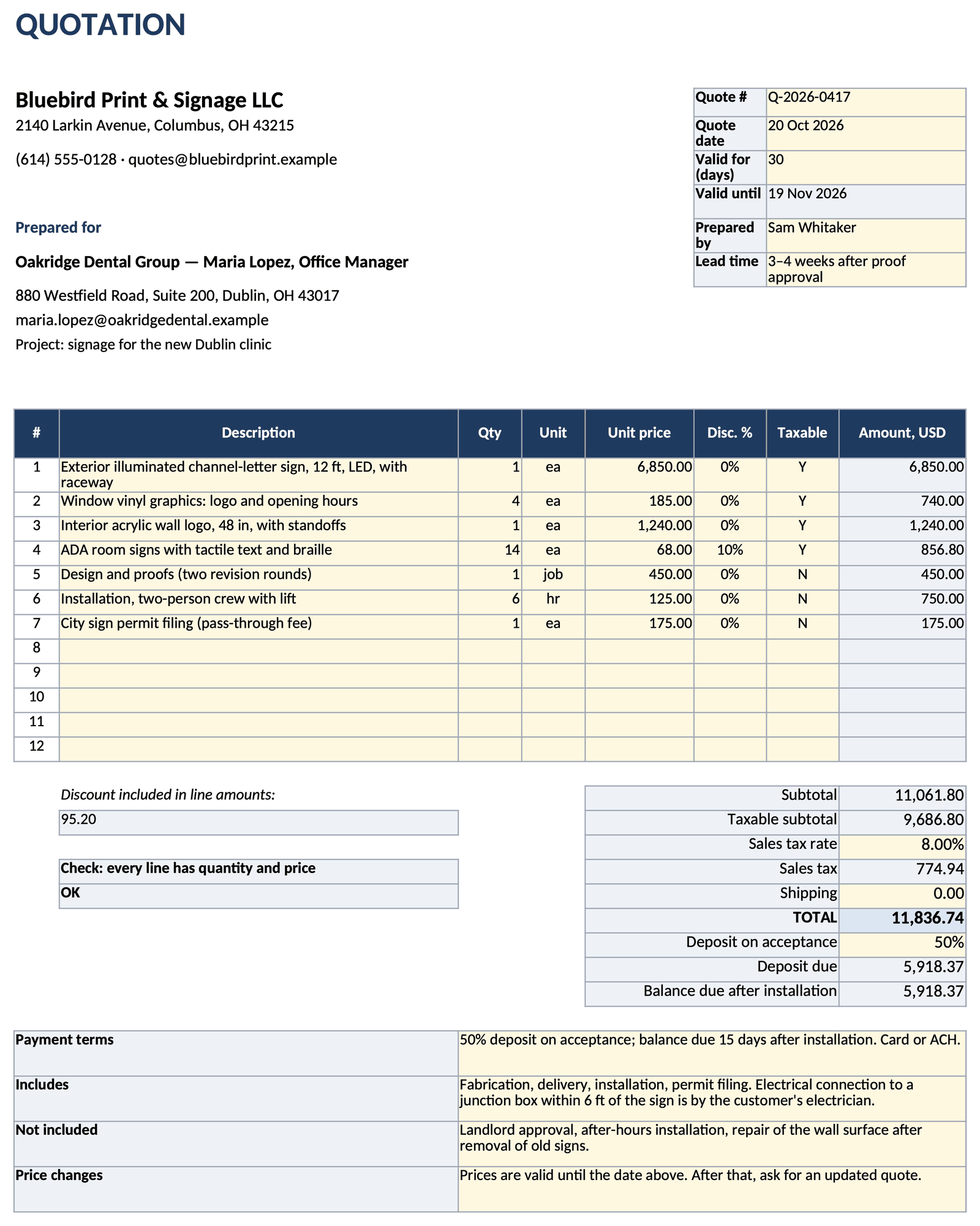
A client asked what it will cost. The quote has to be right the first time, look the same on every screen and say clearly how long the price holds. This live spreadsheet opens on the page without registration: line items with discounts and a taxable flag, sales tax, total, deposit and balance are formulas, and the expiry date follows from the quote date. When it is ready, send it by email as a View only or Can edit link instead of an attachment.
How to use it
1
Your company, the client's contact, the quote number and the date. One line per item or service, with a unit the client recognizes: ea, hr, job.
2
Enter quantity, unit price and any line discount. Mark each line taxable or not and set your sales tax rate; subtotal, tax and total calculate.
3
Days valid turn into a Valid until date. Add payment terms, lead time, what is included and what is not.
4
Email the quote as a link. On the paid plan you see when the client opened it and for how long, and can send a reminder from the quote if there is no answer.
Filled example
The filled example is a signage quote from a fictional print shop to a dental group opening a new clinic: seven lines from an illuminated exterior sign to permit filing, a 10% discount on room signs, sales tax on the taxable items only, a 50% deposit and a 30-day validity.
Common mistakes
A client who comes back six months later expects the old price. Always state a Valid until date and what happens after it.
A manual total drifts from the lines after the first edit. Keep every amount a formula and check that each line has a quantity and a price.
If you give a discount, show it on the line. The client sees what they got, and the next negotiation starts from the list price.
FAQ
Filling in and viewing are free and need no account; sign-in appears only when you save or send your own document. The free plan includes sending by link, 3 signatures a month and a PDF with a “Made with Layers” line. The paid plan, $12 a month billed annually or $15 month to month, adds clean .docx and PDF files, unlimited signatures, view analytics (who opened, how long) and reminders. Recipients never need an account.
A quote is a fixed price for a defined scope, valid until a date. An estimate is an approximate figure that can change. If the price can change, call it an estimate and say why.
Often an accepted quote forms a contract, but this depends on your jurisdiction and the terms. If it matters, have your terms checked by a lawyer.
Yes. Next to Download there is Send for signature: the signer confirms with a code sent to their email (a simple electronic signature), and the signed version is recorded. Whether that is enough for your contract depends on the law that applies; if it matters, ask a lawyer.
On the paid plan, yes: when you send the quote as a link, you see when it was opened and how long it was viewed. Tracking works through the link only, with no hidden pixels, and the client's page says: “The sender will see that you opened this document.”
On the free plan you download a PDF with a “Made with Layers” line. The .xlsx file that opens in Microsoft Excel, with the formulas intact, is on the paid plan.
We use no advertising cookies. With your consent we turn on Google Analytics to see which pages help; without it nothing is sent to Google. About cookies