 Jira & Confluence



 Bitrix24
 Comparing annual with one-time prices
A low setup fee can hide a high yearly fee. Compare the total cost over the contract term.
Work
ProjectsTasks, sprints and milestones PagesDocs and knowledge base FormsSurveys, quizzes, booking FlowProcesses and mockupsTender · step 2 of 3 · compare proposals
Disqualify on must requirements first, let each evaluator score 1–5 on their own, score price by formula, and decide only when the checks say OK.
No sign-up to start. The document stays editable in this browser; sign-in appears only when you save it to a workspace or invite a team.
Start editing here — no sign-up. Send the result first; sign in only if you want to keep it in a workspace or invite your team.
The situation
The proposals are in and they do not line up: different prices, different promises, three people with three opinions. This workbook opens on the page without registration. Supplier answers go on the Responses sheet, one row per supplier, in the same order as the RFP response form; evaluators type scores, and the workbook works out the price score, weighted totals, ranking and the recommended supplier.
How to use it
1
A supplier that answered Does not meet on a must requirement is disqualified and not ranked. The Scoring sheet counts these for you.
2
5 exceeds the requirement with evidence, 3 meets it, 1 does not address it. Each evaluator scores alone, then the panel discusses big gaps.
3
Lowest 3-year cost ÷ this supplier's 3-year cost × 5, where 3-year cost = one-time + 3 × annual. The cheapest gets 5; nobody's opinion moves it.
4
Weights total 100%, no missing scores, scores within 1–5, exactly one winner. Fix anything that is not OK before the decision.
Filled example
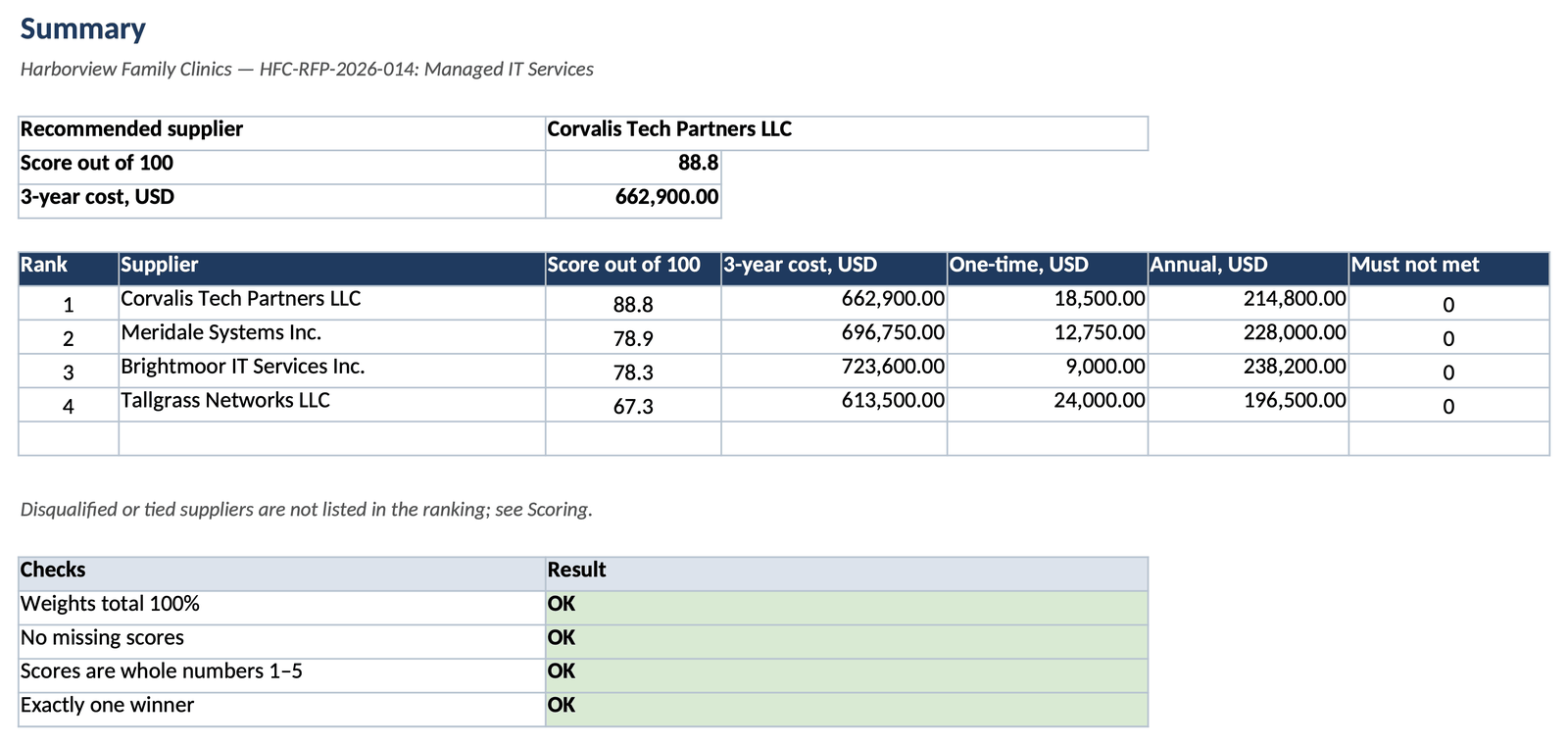
The filled example scores four proposals for Harborview Family Clinics' managed IT services: three evaluators, six criteria scored by the panel plus price by formula, weights 25/20/15/10/5/5/20. All four meet the must requirements; the recommended supplier is not the cheapest one.
Common mistakes
A low setup fee can hide a high yearly fee. Compare the total cost over the contract term.
A missing score silently drags a supplier down. The sheet counts missing scores per supplier and the check stays red until they are filled.
Two suppliers with the same total need a recorded tie-break, such as lower price or the presentation, before the award.
FAQ
It is free and opens without an account. Sign-in appears only when you save the workbook to a workspace or invite evaluators to it.
Lowest 3-year cost ÷ this supplier's 3-year cost × 5. The lowest bid scores 5 and a bid twice as expensive scores 2.5, so price differences stay proportional.
The example contract runs three years. Use the term of your own contract so setup fees and recurring fees are compared on the same basis.
Separately first, so the loudest voice does not set everyone's score, then together to discuss differences. The workbook keeps each evaluator's scores and averages them.
Yes. It uses functions available since Excel 2007, such as SUMPRODUCT, RANK, INDEX and MATCH, and opens without macros.
We use no advertising cookies. With your consent we turn on Google Analytics to see which pages help; without it nothing is sent to Google. About cookies