 Jira & Confluence



 Bitrix24
 Netting differences
Two errors that cancel out still need two corrections. Explain items one by one, not the net amount.
Work
ProjectsTasks, sprints and milestones PagesDocs and knowledge base FormsSurveys, quizzes, booking FlowProcesses and mockupsReconcile with a counterparty · step 2
Put your ledger and theirs side by side, match by reference, and explain each difference. The reconciliation is done when the unexplained difference is 0.00.
No sign-up to start. The document stays editable in this browser; sign-in appears only when you save it to a workspace or invite a team.
Start editing here — no sign-up. Send the result first; sign in only if you want to keep it in a workspace or invite your team.
The situation
Your books say you owe a supplier one amount, their statement says another. Usually it is a handful of items: a payment still in transit, a credit note one side has not booked, a price that differs, an invoice posted twice. This live spreadsheet matches both ledgers by reference and shows those items. Send the supplier a link with editing on: they fill in or confirm the Their ledger sheet without an account, and the match updates.
How to use it
1
Export your entries for the period with your opening balance into Our ledger.
2
Paste their statement into Their ledger, or share the link so the other party fills it in themselves.
3
On the Match sheet, give every line that is not Matched a reason and the side that will correct it.
4
Unexplained difference must be 0.00. The agreed balance after corrections goes into the signed statement.
Filled example
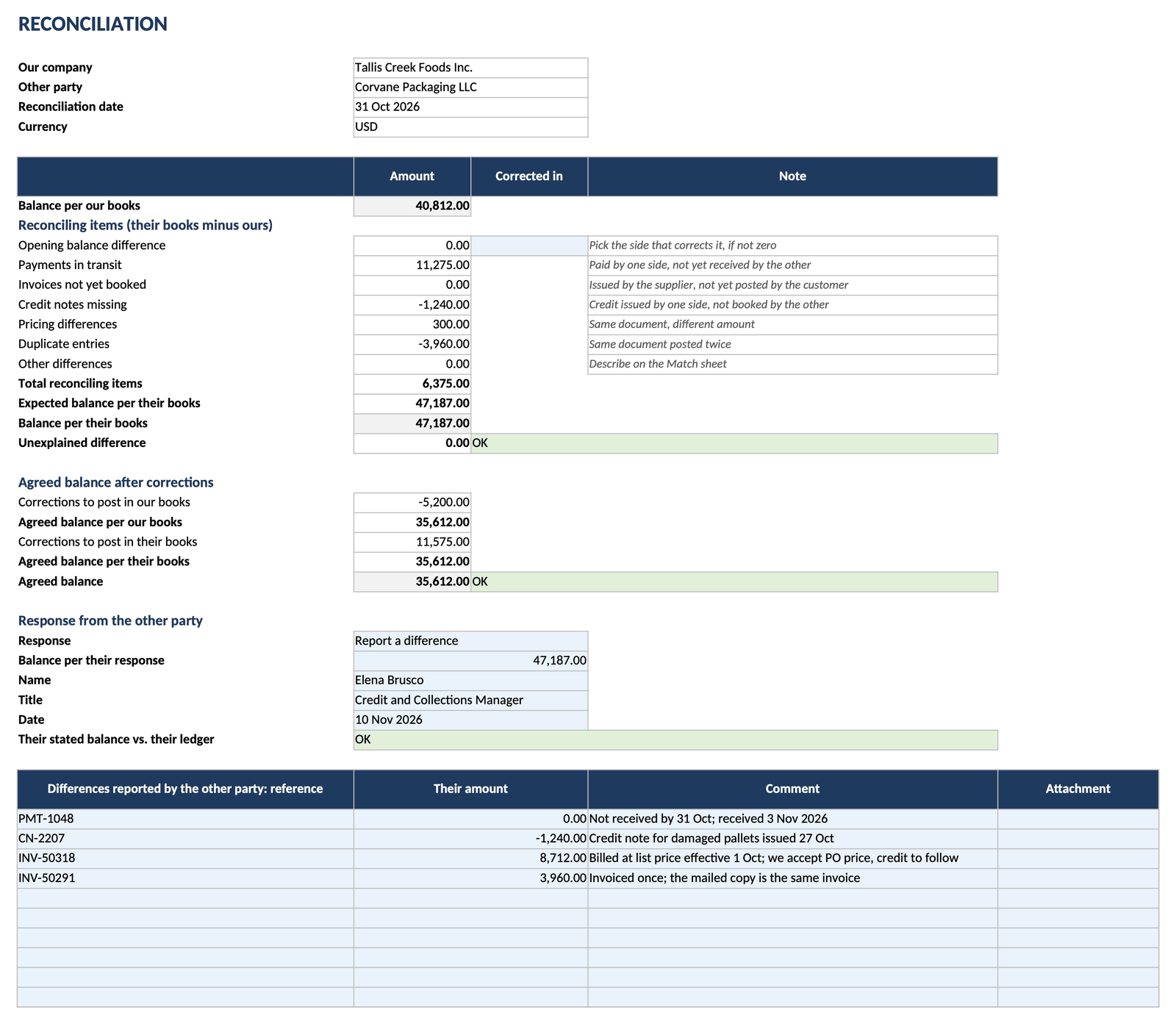
The filled example reconciles a food manufacturer's payables with its packaging supplier for August to October 2026: 40,812.00 in the customer's books, 47,187.00 in the supplier's. Four items explain the 6,375.00: a payment in transit, an unbooked credit note, a 300.00 price difference and a duplicate invoice. The agreed balance is 35,612.00.
Common mistakes
Two errors that cancel out still need two corrections. Explain items one by one, not the net amount.
Match on the supplier's invoice number and the payer's payment reference on both sides, not on internal document numbers.
A payment in transit clears when the other side posts it. Do not book an adjustment for it.
FAQ
It is free, and the spreadsheet opens on this page without an account. Sign-in appears only when you save it, invite your team or share it with the other party.
Their ledger and the reconciliation result. They open it with a link and a one-time code sent to their e-mail, and they do not need an account.
Yes. The sheet only assumes one sign: a positive balance means the customer owes the supplier. Use it the same way for a customer account or for two companies in one group.
By reference. For each reference the sheet compares the totals in both ledgers and marks it matched, amount differs, only in ours, only in theirs or duplicate.
The difference appears as its own reconciling item. Reconcile the earlier period first, or agree which side corrects it.
A PDF with a “Made with Layers” line is free. The Excel file with all formulas is on the paid Send plan.
We use no advertising cookies. With your consent we turn on Google Analytics to see which pages help; without it nothing is sent to Google. About cookies