 Jira & Confluence



 Bitrix24
 Unapplied payments
A payment that is not applied to an invoice leaves old invoices looking overdue. Apply it, or it shows as an unapplied credit.
Work
ProjectsTasks, sprints and milestones PagesDocs and knowledge base FormsSurveys, quizzes, booking FlowProcesses and mockupsReconcile with a counterparty · step 1
List every invoice, payment and credit on the account for the period. The sheet keeps the running balance and ages what is still open at the statement date.
No sign-up to start. The document stays editable in this browser; sign-in appears only when you save it to a workspace or invite a team.
Start editing here — no sign-up. Send the result first; sign in only if you want to keep it in a workspace or invite your team.
The situation
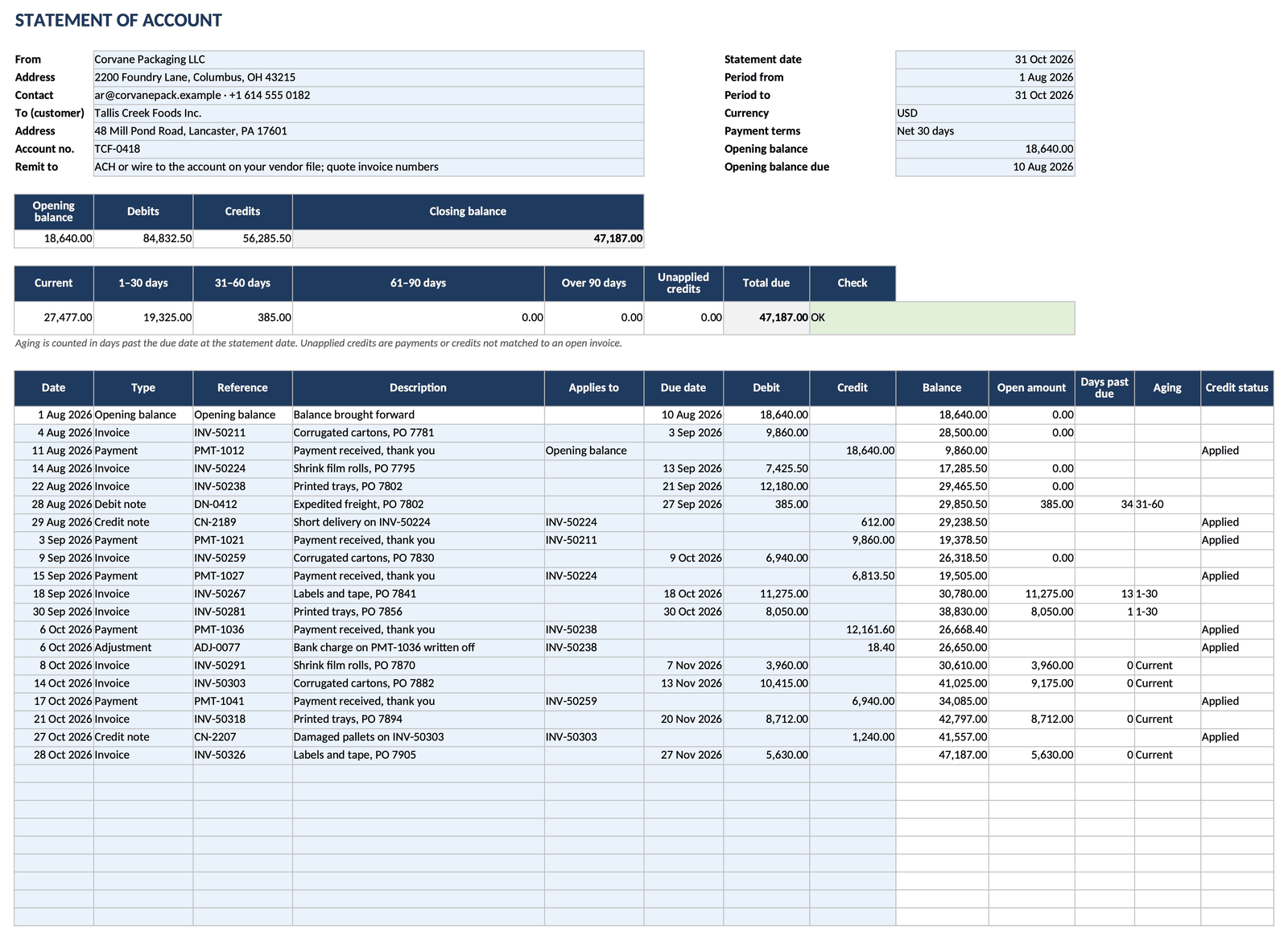
Quarter end, an audit, or a customer who says they owe less than you think. Before anyone argues about the number, both sides need the same list: opening balance, every document since, and what is still unpaid and how late. This live spreadsheet opens on the page without registration. Type or paste your lines and the balance, closing balance and aging update as you go.
How to use it
1
Enter the statement date, the period, the currency and the opening balance with the date it fell due.
2
One line per invoice, debit note, payment, credit note or adjustment, in date order, with its own reference.
3
In Applies to, name the invoice each payment or credit settles. This is what makes the aging correct.
4
The check cell must show OK: the aging total equals the closing balance. Then send the statement to the customer.
Filled example
The filled example is a supplier's statement to a food manufacturer for August to October 2026: an opening balance of 18,640.00, 19 documents, a closing balance of 47,187.00 and an aging of 27,477.00 current, 19,325.00 at 1–30 days and 385.00 at 31–60 days.
Common mistakes
A payment that is not applied to an invoice leaves old invoices looking overdue. Apply it, or it shows as an unapplied credit.
The customer matches your lines to theirs by invoice and payment number. A line without a reference cannot be matched.
Count days past the due date, not the invoice date, or every invoice on 30-day terms looks a month late.
FAQ
It is free, and the spreadsheet opens on this page without an account. Sign-in appears only when you save it to your workspace or invite your team.
An invoice asks for payment of one sale. A statement lists every invoice, payment and credit on the account for a period and shows the balance.
For each invoice, the open amount is the invoice less the payments and credits applied to it. Days past due are counted from the due date to the statement date and grouped into current, 1–30, 31–60, 61–90 and over 90 days.
Split it into one line per invoice with the same payment reference and date, each applied to its invoice.
A PDF with a “Made with Layers” line is free and needs no registration. The Excel file that keeps the formulas is on the paid Send plan.
Next step
We use no advertising cookies. With your consent we turn on Google Analytics to see which pages help; without it nothing is sent to Google. About cookies