 Jira & Confluence



 Bitrix24
 Quotation · Excel · GST
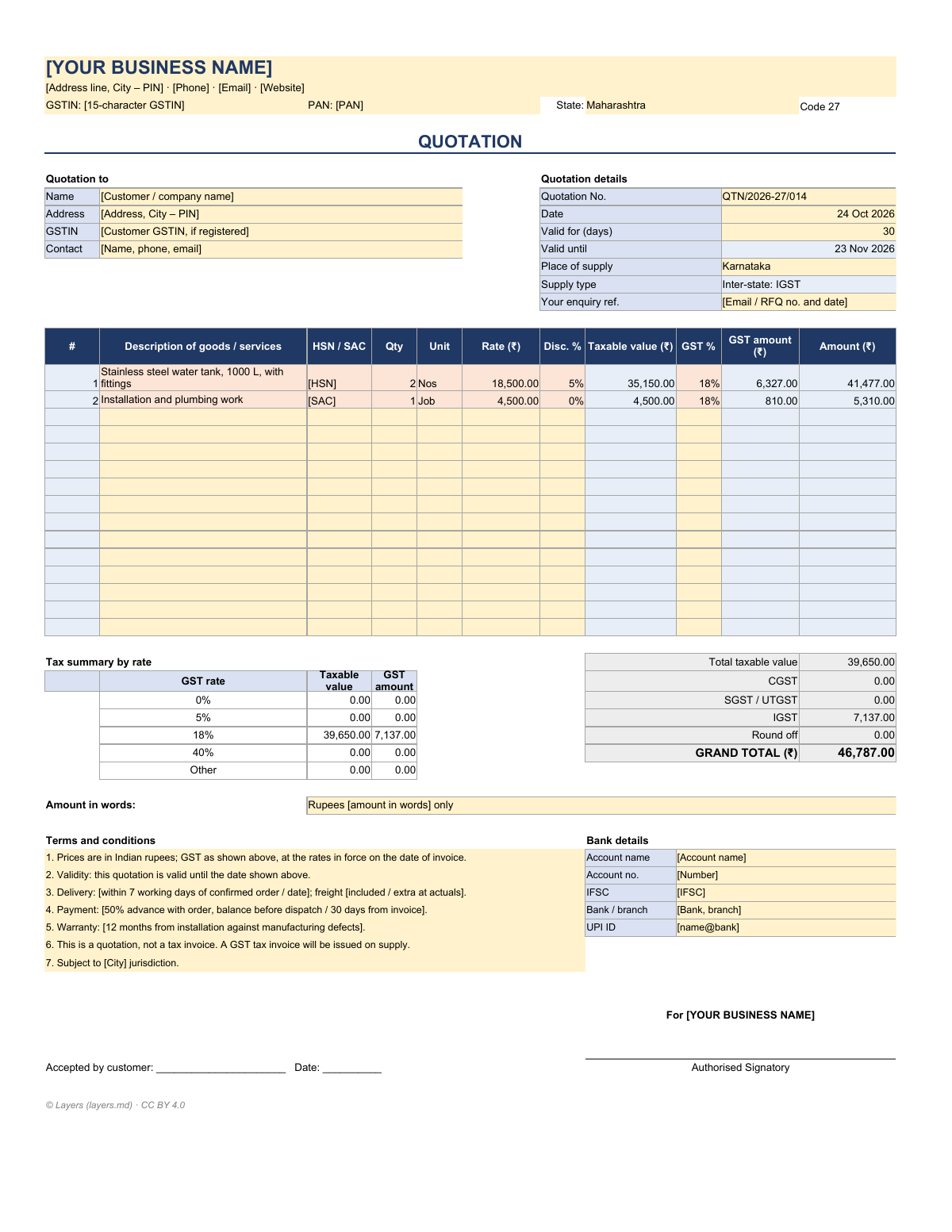
Quotation format with GST — Excel that splits CGST, SGST and IGST for you
Short answer. Enter your items, HSN/SAC codes and GST rates. Same state: CGST + SGST (or UTGST), half the GST rate each (IGST Act — intra-state supply).
We will ask you to confirm this address, then email you the recipient’s reply.
Start typing right in the document — no sign-up. It stays in this browser; save it to your free Layers account to keep it, open it on your phone and share it.
- Follow up with the customertype the date
- Example 30-day validity endstype the date
Check your own case.
Validity is your commercial choice, not a legal period. Change the days in the Excel file to what you offer.

Meera, Layers template assistant
Enter the quotation date and I will show the follow-up day and when the price expires.
The GST quotation in Excel is open below — start with your state and the customer’s place of supply.
Deadlines
The rules, with the source
| What | Deadline | Source |
|---|---|---|
| Same state | CGST + SGST (or UTGST), half the GST rate each | IGST Act — intra-state supply |
| Different state | IGST at the full rate | IGST Act — inter-state supply |
| Line value | quantity × rate × (1 − discount %) | arithmetic |
| Valid until | quotation date + days valid | your terms |
| Not registered | no GST shown or collected — use the no-GST sheet | CGST Act |
A quotation is an offer, not a tax invoice. GST rates are notified per HSN/SAC and change from time to time — confirm the current rate before you quote.
Step by step
What to do, in order
1
Fill in your header
Business name, address, GSTIN, PAN and your state.
2
Add the customer
Name, address, GSTIN if registered, and the place of supply.
3
List the items
Description, HSN or SAC, quantity, unit, rate, discount and GST rate.
4
Check terms and validity
Delivery, payment, warranty and how many days the price holds.
5
Sign and send as PDF
Then issue a GST tax invoice when you actually supply.
Questions
What is the format of a quotation?
Your business details and GSTIN, “QUOTATION”, quotation number and date, validity, customer details, an item table (description, HSN/SAC, quantity, rate, discount, GST), totals, terms, bank details and an authorised signature.
Is a quotation the same as an invoice?
No. A quotation is an offer before the sale. When you supply the goods or services you issue a tax invoice with the details GST law requires.
How does the sheet choose CGST/SGST or IGST?
It compares your state with the place of supply. Same state — CGST and SGST at half the rate each; different states — IGST at the full rate.
Which GST rate should I use?
The rate notified for each HSN or SAC code. The sheet accepts any rate from 0% to 40%; check the current rate on the CBIC portal or with your accountant.
I am not registered under GST. Can I use it?
Yes — use the “Quotation (no GST)” sheet. An unregistered supplier should not show or collect GST.
Can I make the quotation in Word instead?
The Excel version calculates for you; copy the filled table into a Word letter if your customer wants a covering letter.
Can I tell if the customer opened it?
Yes. Sent from Layers, you see when the customer opened the quotation and how long they read, you can remind them before it expires, and they can accept by signing with a code from their email.
Official sources
Other documents
Keep the papers in one place
Letters, receipts and notices in one folder you can share with family or a lawyer. The templates and the editor are free; Layers is free for up to 20 people.
Commercial template and arithmetic aid, not tax advice. Confirm GST rates, place of supply and invoice rules with a qualified professional.